Essential Components of a Valid Invoice
An invoice is a critical financial document used for billing, accounting, and tax compliance. Understanding the essential invoice components ensures that every billing document is accurate, professional, and legally valid. Whether you are a freelancer, small business owner, or enterprise, using a structured invoice format helps avoid disputes, improves cash flow, and simplifies financial record-keeping. In this guide, you will learn every key element required in a professional invoice and how to implement them effectively.
Seller (Business) Information
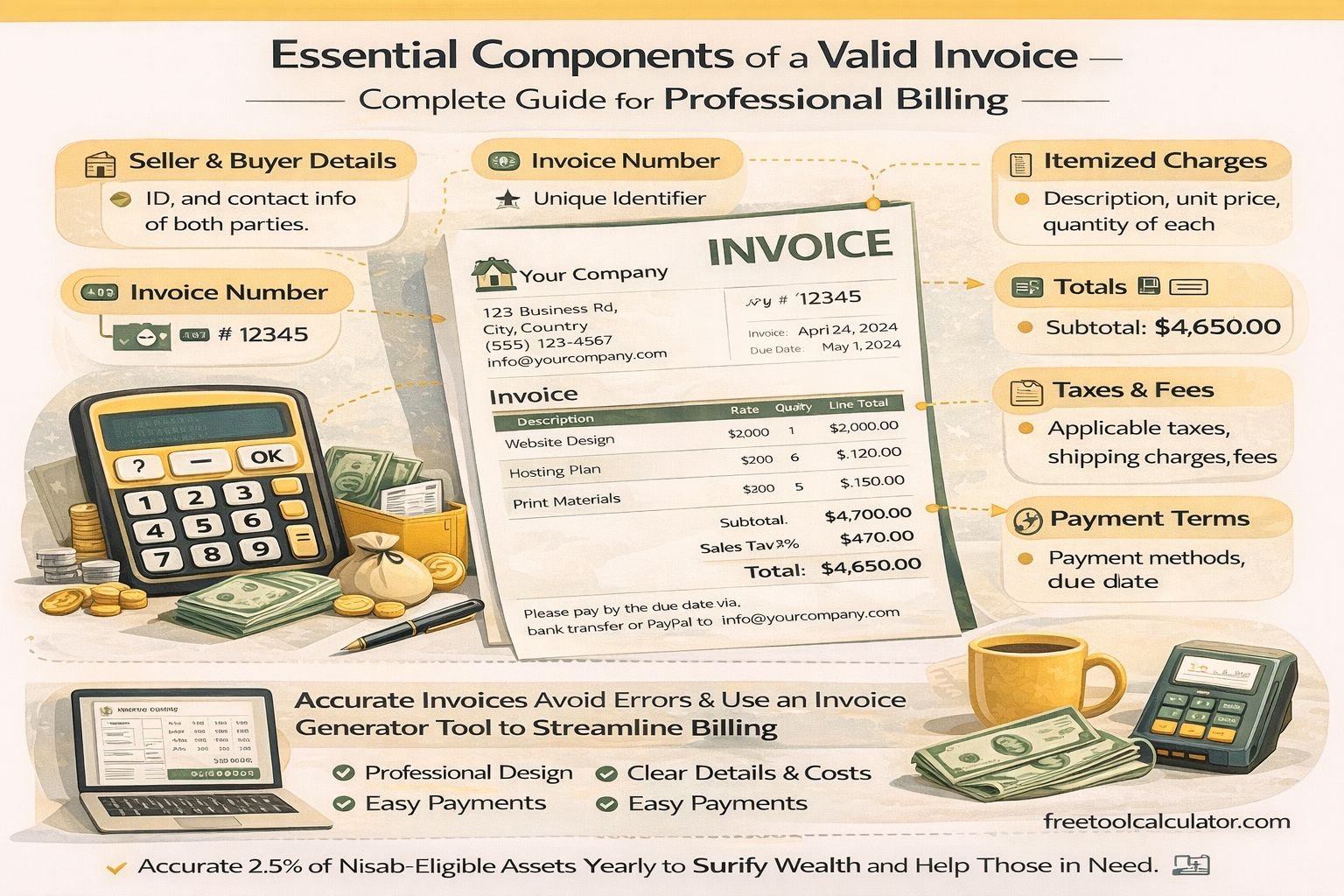
The first essential component of an invoice is the seller’s information. This identifies the business issuing the invoice and establishes credibility.
This section should include the business name, registered address, contact details such as phone and email, and any relevant registration numbers. If applicable, include tax identification numbers like VAT or GST.
Accurate seller details are crucial for tax reporting and maintaining professional billing standards. Missing or incorrect business information can lead to compliance issues and payment delays.
Buyer (Client) Information
The invoice must clearly specify the buyer or client receiving the goods or services. This ensures the invoice is directed to the correct entity.
Include the client’s full name or company name, billing address, and contact information. For business-to-business transactions, including the client’s tax identification number is recommended.
Proper buyer identification helps prevent disputes and ensures smooth processing in client accounting systems.
Unique Invoice Number
Every invoice must contain a unique invoice number. This is a fundamental requirement for tracking, auditing, and financial management.
A well-structured invoice numbering system may follow formats like INV-001, 2026-INV-1001, or similar sequences. Consistency is key.
A unique invoice ID helps in tracking payments, managing records, avoiding duplication, and simplifying audits.
Invoice Date and Due Date
The invoice date indicates when the invoice is issued, while the due date specifies when payment is expected.
Including both dates ensures clarity in payment timelines and helps businesses manage receivables effectively.
Some invoices also include a service or delivery date, which is useful for project-based or recurring services.
Itemized List of Products or Services
An itemized invoice is a core element of transparent billing. It provides a detailed breakdown of all goods or services provided.
Each line item should include the description of the product or service, quantity, unit price, and total cost per item.
This level of detail ensures the client understands exactly what they are being charged for, reducing confusion and disputes.
Using a structured tool like an invoice generator can automate itemized billing and ensure accuracy.
Subtotal Calculation
The subtotal represents the total amount before taxes, discounts, or additional charges are applied.
It is calculated by summing all individual line item totals. A clearly defined subtotal improves transparency and helps clients verify calculations easily.
Tax Calculation (GST, VAT, Sales Tax)
Taxes are a mandatory component of most invoices, depending on the region and type of transaction.
This section should clearly specify the type of tax, tax rate, and tax amount.
Proper tax breakdown ensures compliance with local tax regulations and supports accurate accounting.
Total Amount Payable
The total amount is the final figure the client must pay.
The formula is: Total = Subtotal + Taxes − Discounts. This amount should be prominently displayed to avoid confusion.
Payment Terms
Payment terms define how and when the payment should be made.
Common examples include Net 7, Net 15, or Net 30. You may also include late payment penalties or early payment discounts.
Payment Details
This section provides the necessary information for completing the payment.
Include bank account details, IBAN or SWIFT codes, and accepted payment methods such as credit cards or online payments.
Notes and Additional Information
This optional section can include thank you messages, terms and conditions, or additional service notes.
Logo and Branding
A professional invoice should include branding elements such as a company logo and consistent design.
Modern tools like an online invoice generator allow easy logo upload and customization.
Common Invoice Mistakes to Avoid
Common mistakes include missing invoice numbers, incorrect tax calculations, lack of itemized details, incorrect client information, and unclear payment terms.
Avoiding these errors ensures smoother financial operations and faster payments.
Why Using an Invoice Generator Matters
Manually creating invoices can lead to errors and inconsistencies. Using a digital tool simplifies the entire process.
Benefits include automatic calculations, professional formatting, time-saving workflow, reduced human error, and consistent invoice structure.
A reliable invoice generator tool ensures that all essential invoice components are included and correctly formatted.
Conclusion
A valid invoice is more than just a payment request. It is a structured financial document that supports accounting accuracy, tax compliance, and professional communication.
By including all essential invoice components such as seller and buyer details, invoice number, dates, itemized charges, tax breakdown, total amount, and payment terms, businesses can create reliable and professional invoices. Using standardized tools ensures consistency, reduces errors, and improves overall business efficiency.