What This Add Data Guide Really Means
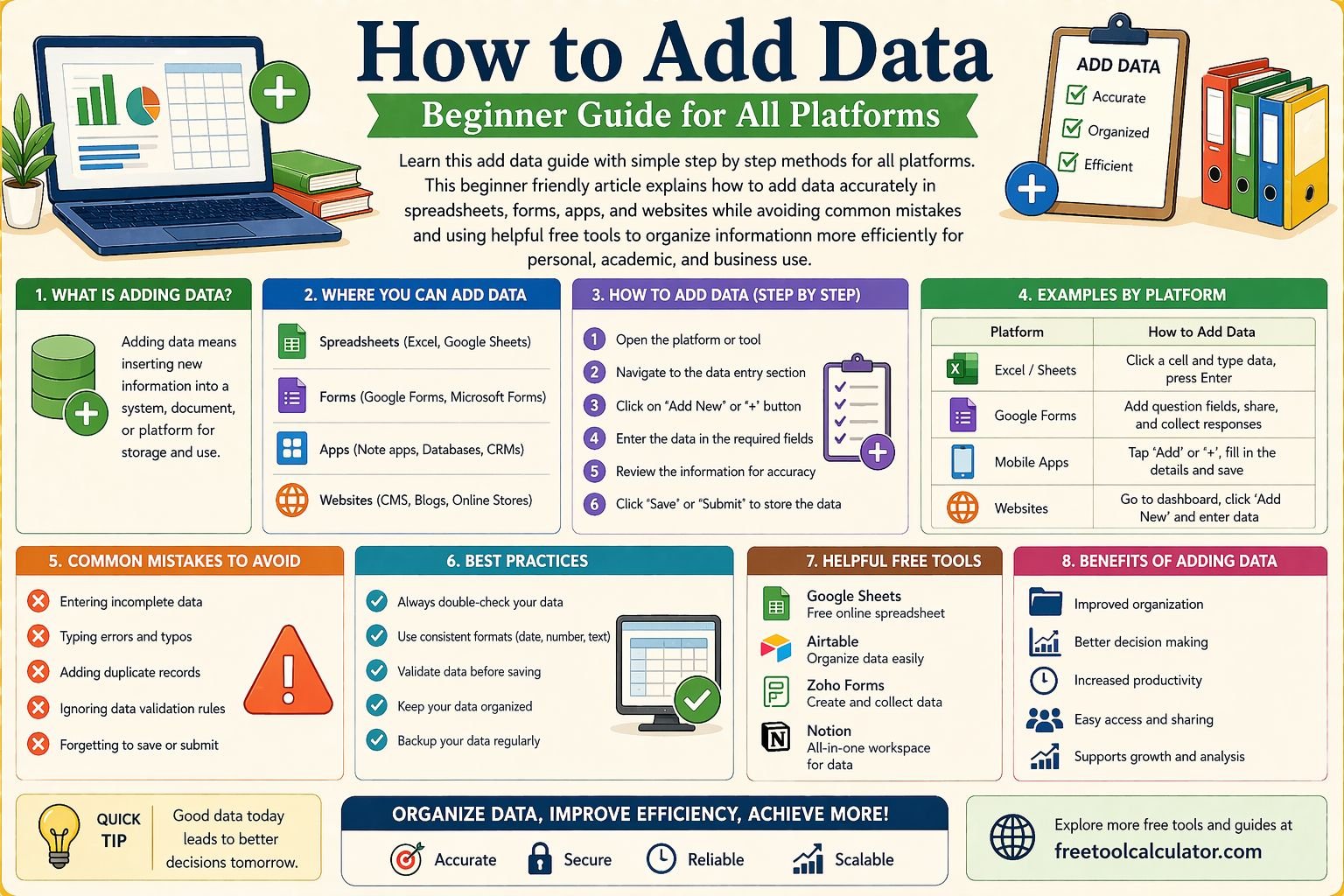
This add data guide is designed for beginners who want to understand how to add data correctly across different platforms without confusion. In simple terms, adding data means entering information into a system so it can be stored, organized, processed, or analyzed later. That information may include names, numbers, dates, prices, text entries, measurements, contact details, survey answers, or any other structured input. Whether you are working in a spreadsheet, online form, app dashboard, website backend, or reporting tool, the process of adding data is a basic but essential digital skill.
Many people assume data entry is only about typing information into boxes, but good data entry is really about accuracy, consistency, and structure. If the data is entered poorly, the results can be misleading, incomplete, or difficult to use later. That is why learning how to add data properly saves time and reduces mistakes. If you need to organize numeric information into a visual format later, tools like the table chart maker can help turn entered values into clearer tables for reporting and presentation.
How to Add Data on Different Platforms
The way you add data depends on the platform you are using, but the core idea stays the same. On spreadsheets like Excel or Google Sheets, you usually click a cell and enter text, numbers, or formulas. On websites, you may use forms that ask for specific details such as your name, email address, or phone number. In mobile apps, you may be asked to add data through settings, profile sections, activity logs, or record keeping tools. In business software, you may need to fill in fields for inventory, customer information, billing, or task management.
This add data guide works across all of these environments because the main principles are universal. You first understand what information is required, then enter it in the correct place, use the correct format, review it, and save or submit it. People often get overwhelmed because every interface looks different, but once you understand the logic behind data entry, the platform becomes much easier to use. If your data includes calculations or totals, you can also use the number sum calculator to quickly add lists of values before entering final totals into your document or system.
Why Accurate Data Entry Matters
Accurate data entry matters because every report, chart, calculation, and decision built on that data depends on the quality of the original input. A single wrong number, misspelled name, or incorrect date can create bigger problems later. In schools, this may affect grades or attendance records. In business, it may affect invoices, customer profiles, stock levels, or project timelines. In personal use, it may create errors in budgets, trackers, and schedules.
When people search for how to add data, they usually want the technical steps, but the real value comes from understanding why precision matters. Clean data helps with searching, sorting, filtering, and analyzing information later. It also improves collaboration when multiple people are working in the same system. If your entries are inconsistent, others may not understand what you entered or how to use it. That is why this add data guide focuses not just on where to type, but how to enter information in a way that stays useful over time.
Add Data Step by Step for Beginners
The simplest way to learn data entry is to break the process into a repeatable method. First, identify what type of data you need to add. Is it text, numbers, dates, percentages, prices, labels, or descriptions. Second, identify where that data belongs. This could be a form field, spreadsheet cell, database row, or content box. Third, check the required format before typing anything. Some fields require numbers only, some require full dates, and others require specific naming rules.
Once you enter the information, review each value carefully before saving. This is where many mistakes happen because users type quickly and assume the entry is correct. After reviewing, save or submit the entry and confirm that it appears correctly in the system. This add data step by step approach works well because it slows the process just enough to improve accuracy without making it difficult. If you need to compare date based entries later, such as schedules or records, the date time difference calculator can be useful for checking duration and consistency between saved data points.
How to Add Data in Spreadsheets
Spreadsheets are one of the most common places where people need an add data guide. In a spreadsheet, data is entered into rows and columns. Each row usually represents one item or record, while each column represents a category such as name, date, quantity, or value. The first step is to create clear column headings so every piece of information has a defined place. This structure helps avoid confusion and makes it easier to sort or filter later.
When adding data to a spreadsheet, always enter one type of information per column. For example, do not mix phone numbers and names in the same column, and do not combine dates with comments in one field unless it is specifically a notes column. This improves readability and allows formulas and filters to work correctly. If you plan to summarize or visualize the data later, entering it cleanly from the start will save a lot of editing time. Good spreadsheet habits are one of the most practical parts of learning how to add data effectively.
How to Add Data in Online Forms
Online forms are another common environment where beginners need help with data add tasks. Forms are usually designed with fixed fields, which means they guide you more than spreadsheets do. Still, users make mistakes when they rush, skip instructions, or misunderstand the input format. A field may ask for an email address, phone number, postal code, quantity, or date, and each field may have different validation rules.
The best way to use online forms is to read the label for each field carefully and enter only the information that belongs there. If the form asks for numbers only, avoid typing text. If it asks for a full date, enter the day, month, and year in the expected format. If a field is optional, do not force unnecessary information into it. This add data guide emphasizes reading before typing because form errors usually come from assumptions. When the form is complete, review everything once before clicking submit. That simple habit prevents many common submission mistakes.
How to Add Data in Mobile Apps and Dashboards
Mobile apps often simplify the appearance of data entry, but they can still cause problems because the smaller screen makes it easier to miss labels, dropdowns, or required fields. Whether you are logging health information, adding contacts, updating expenses, or managing projects, the principle remains the same. You need to understand what each field is asking for and use consistent formatting every time.
Apps often use buttons, sliders, toggles, date pickers, and dropdown menus instead of open text boxes. That makes input easier, but it also means users need to slow down and confirm selections. If you tap the wrong option, your saved data may be technically accepted but factually incorrect. This is especially important when adding financial, time, or measurement data. A careful review before saving is just as important on mobile as it is on desktop. Learning how to add data on apps is mostly about attention to detail rather than technical difficulty.
Common Mistakes People Make When They Add Data
One of the biggest mistakes beginners make is inconsistent formatting. For example, one row may use full names while another uses initials, one date may be written as 05 01 2026 while another is written as January 5, 2026, and one price may include decimals while another does not. These differences make sorting and analyzing data much harder later. Consistency is one of the most important lessons in any add data guide.
Another common mistake is entering too much information into one field. People sometimes place full notes, multiple values, or mixed content into a single box because it feels faster in the moment. Later, however, that data becomes difficult to search or separate. Skipping verification is another major issue. Many users save data without rechecking spelling, numerical accuracy, or placement. Even when the system accepts the input, that does not mean the data is correct. The platform only checks format in many cases, not meaning. That is why human review is still important.
Best Practices to Keep Data Clean and Useful
The best way to keep data useful is to think beyond the moment of entry. Ask yourself how this information will be used later. Will it be sorted, filtered, counted, compared, exported, or shared with others. If the answer is yes, your entries should be structured in a clean and consistent way from the beginning. Use standard naming patterns, stick to one date format, keep categories clear, and avoid unnecessary abbreviations unless everyone using the system understands them.
Another best practice is to use validation and helper tools when possible. Dropdown menus, required fields, formatting rules, and formula checks can reduce manual mistakes. Even simple habits such as entering data in a quiet environment, reviewing entries in batches, and checking totals before saving can dramatically improve quality. If your data needs to be presented visually after entry, structured tools like the table chart maker can help you turn plain inputs into readable output without rebuilding everything from scratch. Clean input always creates better output.
How to Organize Data After Entry
Adding data is only the first part of the process. Once the information is entered, it needs to be organized so it remains easy to understand and use. In spreadsheets, this often means sorting rows by date, name, or category. In databases or apps, it may involve labels, filters, tags, or folders. In forms and internal systems, it may mean verifying that the submission appears under the correct record or section.
This is where a strong add data guide becomes more than a typing tutorial. Good data entry includes thinking about retrieval. Can you find the record later. Can someone else understand it. Can the values be summarized or compared. If not, the structure may need improvement. Organizing your information early helps prevent confusion as the amount of data grows. Beginners often underestimate how quickly simple lists become difficult to manage. That is why organizing after entry should be treated as part of the same workflow, not a separate optional step.
How to Add Data More Efficiently Without Losing Accuracy
Speed matters, but not at the cost of quality. The best way to add data faster is to build habits that improve efficiency while protecting accuracy. Start by preparing your source information before you begin. If you are copying from notes, emails, forms, or receipts, organize that source material first. This reduces back and forth movement and lowers the chance of missing entries.
You can also work in batches. Enter similar types of information together rather than jumping between unrelated fields or tasks. That helps your brain stay in one pattern and reduces formatting mistakes. Keyboard shortcuts, autofill tools, and templates can also save time in spreadsheets and dashboards. Still, even when using faster methods, review remains essential. Efficient data entry is not rushed data entry. It is organized data entry. This distinction makes a major difference in accuracy and long term usability.
Who Needs an Add Data Guide Most
An add data guide is useful for students, office workers, freelancers, shop owners, website managers, researchers, and anyone who works with digital records. Students may need it for assignments, attendance logs, or project sheets. Small business owners may use it for inventory, sales, expenses, and customer details. Freelancers may need it for invoices, reports, and client records. Website owners may use it to update content, upload product details, or manage internal tracking sheets.
Beginners benefit the most because they often know how to type but have not yet learned how to structure information well. That gap causes avoidable problems later. Once you understand how to add data correctly, many digital tasks become easier. You stop seeing data entry as repetitive typing and start seeing it as a system for keeping information accurate, organized, and ready to use. That shift in mindset improves both confidence and results.
Conclusion
This add data guide shows that adding information correctly is a foundational digital skill that affects accuracy, organization, and decision making across every platform. Whether you are entering names into a form, values into a spreadsheet, or records into an app, the same principles matter every time. Understand the field, use the right format, review the entry, and keep your structure consistent. These habits make your data more reliable and much easier to use later.
If you want to support your workflow after data entry, you can use related tools such as the table chart maker, the number sum calculator, and the date time difference calculator to organize, total, and interpret your entered information more effectively. Clean input creates useful output, and that is the real goal of learning how to add data step by step.