

Social Media Image Size Tool for All Platforms
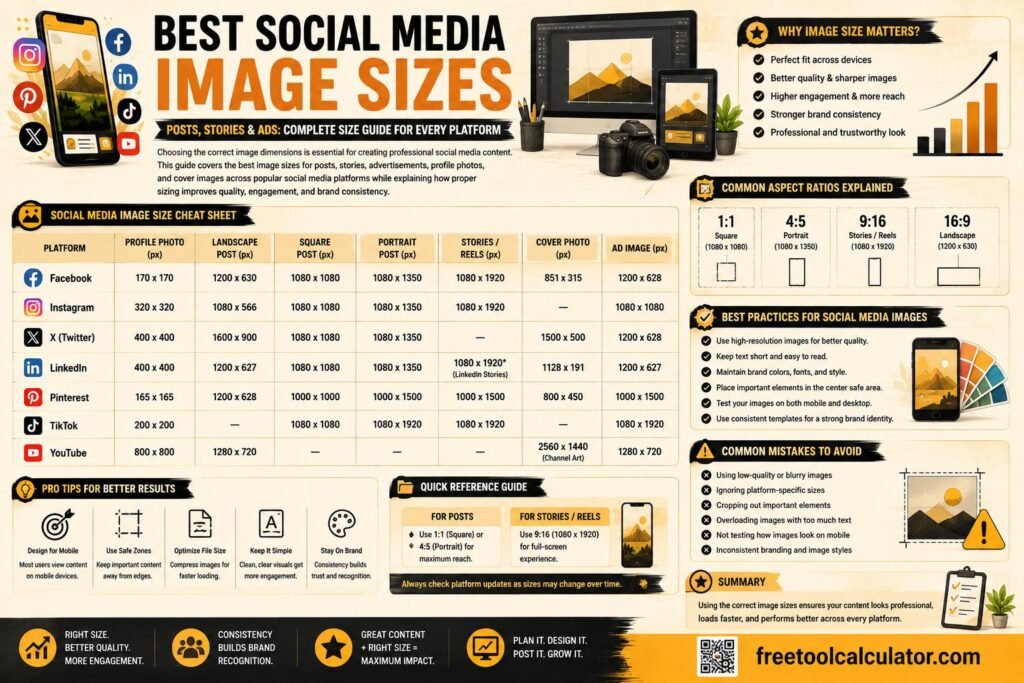
A Social Media Image Size Tool helps creators, marketers, and business owners instantly find the correct image dimensions for every major platform. Instead of searching different guides or uploading the wrong size, this tool gives you ready-to-use sizes for posts, stories, covers, ads, and thumbnails all in one place.
Why Social Media Image Sizes Matter
Every platform crops and displays images differently. If you use the wrong dimensions, your content may look blurry, cut off important text, or appear unprofessional. Correct sizing improves visual quality, increases engagement, and saves editing time especially for agencies and businesses posting regularly.
How the Tool Works
A Social Media Image Size Tool usually lets users:
- Choose a platform (Instagram, Facebook, X, LinkedIn, YouTube, TikTok, Pinterest, etc.)
- Select a content type (post, story, cover, profile, ad, reel, thumbnail)
- Get the recommended size in pixels and aspect ratio
- See a quick preview/crop guide for safe areas (optional)
- Copy dimensions or download size presets (optional)
What Users Get as Output
Once the user selects platform and type, the tool provides:
- Exact pixel dimensions (width × height)
- Aspect ratio (e.g., 1:1, 4:5, 16:9)
- Usage notes (where it fits best and how it will crop)
- Tips for keeping text/logo in safe zones
- Optional export presets for tools like Canva/Photoshop
Benefits of Using a Social Media Image Size Tool
- Saves time and reduces trial-and-error
- Improves branding consistency across platforms
- Prevents cropping issues and blurry uploads
- Helps teams and clients follow the same size standards
- Useful for designers, social media managers, and agencies
Final Thoughts
A Social Media Image Size Tool for All Platforms makes content creation smoother and more professional. By using the right dimensions for each platform, you ensure your visuals look sharp, aligned, and ready to perform across every social channel.
About the Social Media Image Sizes
Social Media Image Sizes is a practical browser-based utility for preparing, checking, or visualizing design and content data without installing specialist software. The interactive tool above is the main feature of this page; the guide below explains how to use it responsibly, what the result means, and what to check when the number will be used for a real decision.
How to use this tool
- Read each field label and enter the requested values using the units shown.
- Check that decimal points, percentages, dates, or units have been entered correctly.
- Run the calculation or generation step and review the complete result rather than copying only one number.
- If the result will affect money, health, purchasing, scheduling, or another important decision, verify the inputs and compare the result with an appropriate independent source.
What to know before relying on the result
Social platforms can change recommended dimensions and crop media differently across placements. Preview important text and logos inside safe areas.
Use the output as a practical starting point
Platform requirements, export settings, browser rendering, device pixel density, and design context can affect the final appearance. Preview the result in the destination where it will actually be used and keep an editable source copy when possible.
Common mistakes to avoid
- Mixing measurement systems or entering a value in a different unit from the one requested.
- Using rounded or estimated inputs when more accurate values are available.
- Assuming an online result includes every real-world variable, fee, exception, or personal factor.
- Copying the output without checking whether the result is plausible for the values entered.
Frequently Asked Questions
Is the Social Media Image Sizes free to use?
Yes. You can use the tool in your browser without purchasing specialist calculation software.
Why might my result differ from another calculator?
Different tools can use different assumptions, rounding rules, data sources, formulas, defaults, or conversion precision. Compare the inputs and methodology before deciding that one result is incorrect.
Can I use the result for professional decisions?
It can be useful for preliminary calculations and cross-checking. For regulated, medical, legal, tax, engineering, or other high-stakes decisions, confirm the result with the relevant official source or qualified professional.
How can I report a problem?
If you find a calculation, wording, usability, or technical issue, contact Free Tools Calculator and include the page URL, the inputs you used, the result you received, and what you expected. That makes the issue easier to reproduce and review.
Complete Guide to This Tool
This guide explains how to use the social media image sizes, what the result means, what can affect accuracy, and how to avoid common mistakes. It is written to support the calculator or utility above rather than replace the interactive tool.
Why Social Media Image Size Matters
Correct dimensions help reduce unwanted cropping, soft scaling, awkward previews, and important text being hidden by interface elements. Platforms can change display behavior over time, so treat any size guide as a practical starting point and preview important creative inside the platform before publishing.
For practical use, focus on the inputs that materially change the result and keep units, definitions, and assumptions consistent. If you are comparing results over time, use the same method each time and record any important changes in conditions. This makes the output easier to interpret and reduces the risk of treating a rough estimate as exact.
Dimensions vs Aspect Ratio
Pixel dimensions describe width and height, while aspect ratio describes their proportion. Two images can share the same aspect ratio at different resolutions. When a platform accepts several resolutions, preserving the intended aspect ratio and providing enough source resolution is often more important than matching one exact pixel count.
Square, Portrait and Landscape Posts
Square artwork is convenient for reusable feeds, portrait formats occupy more vertical screen space on phones, and landscape images suit wide compositions. Choose the format based on where the asset will appear rather than forcing one design into every placement.
Instagram, Facebook, LinkedIn and X
Each network has multiple placements—feeds, stories, reels, profile images, link previews, ads, banners, and thumbnails. A dimension suitable for one placement may crop badly in another. Keep logos, faces, product names, and calls to action away from extreme edges.
YouTube and Thumbnail Assets
Thumbnails should remain readable at small display sizes. Use a high-quality 16:9 composition for standard video thumbnails, keep key subjects prominent, and test text legibility at mobile size. Channel artwork and profile images use different dimensions and safe areas.
Image Quality and File Format
JPEG is efficient for photographs, while PNG can be useful for graphics that need transparency or crisp flat elements. Modern formats may be accepted in some workflows, but platform support can differ. Avoid repeatedly downloading and re-uploading compressed copies because quality can degrade.
Designing One Asset for Multiple Platforms
Start with a master design that has generous safe margins and editable layers. Create placement-specific crops rather than stretching one image. Templates can speed production, but every variation should be checked for text wrapping, logo size, focal point, and crop.
Keeping a Size Guide Current
Social platforms update interfaces and media requirements. Before a major campaign, verify the current publishing interface or official platform documentation, especially for paid ads, stories, reels, covers, and other placement-specific creative.
Related Search Terms and Questions
People researching this tool also commonly look for topics such as social media image sizes, best picture size for social media, best size for social media posts, social media post dimensions, social media image dimensions, Instagram image size, Facebook post image size, LinkedIn image size, X image size, Pinterest image size. These phrases describe closely related intents rather than separate features, and the sections above address the underlying questions naturally.
- YouTube thumbnail size
- social media aspect ratio
- square social media image
- portrait social media post
- landscape social media image
- social media video sizes
- social media video size
- video sizes for social media
- social media graphics size
- social media image size guide
Editorial and Accuracy Note
FreeToolCalculator aims to make calculations and digital utilities understandable by explaining the method, assumptions, limitations, and practical checks behind the result. Tool outputs should be verified when they are used for purchasing, professional, financial, religious, health, safety, or other consequential decisions. We review tool guidance periodically as standards, software interfaces, and common practices change.
Getting Better Results From the Social Media Image Sizes
Before using the final output, confirm exactly what question you want the tool to answer. Enter the source information carefully, keep units or labels attached to the values, and review any options that change how the result is produced. A clearly defined input makes the result easier to understand and reproduce.
Use a Small Test Case First
If the interface is unfamiliar, try a simple example whose result you already know. This confirms the expected format and helps identify reversed fields, unsupported characters or an incorrect option before you use more important data.
Save the Context, Not Just the Answer
When a result will be reused later, record the input and settings along with the output. That makes it possible to repeat the process after a value changes and avoids confusion about how the result was obtained. For decisions governed by an external standard or official source, verify the final value against that source.


Social Media Image Size Tool
Choose a platform and post type to get the right pixel size, aspect ratio, and export notes.
Choose Platform
Recommended Size
Copy Notes