Every social media platform has its own recommended image dimensions. Using the wrong image size can result in blurry photos, unwanted cropping, stretched graphics, or important content being cut off. Whether you’re creating content for personal use, a business page, or paid advertising campaigns, choosing the correct dimensions helps your posts appear professional and visually appealing.
As platforms continue to evolve, image requirements also change. Understanding the latest social media image sizes helps you create content that displays correctly across desktops, tablets, and mobile devices while improving user engagement.
If you want quick access to recommended image dimensions for today’s leading social platforms, use our free Social Media Image Sizes tool. It provides an easy reference for creating properly sized graphics without guesswork.
Quick Answer: What Are the Best Social Media Image Sizes?
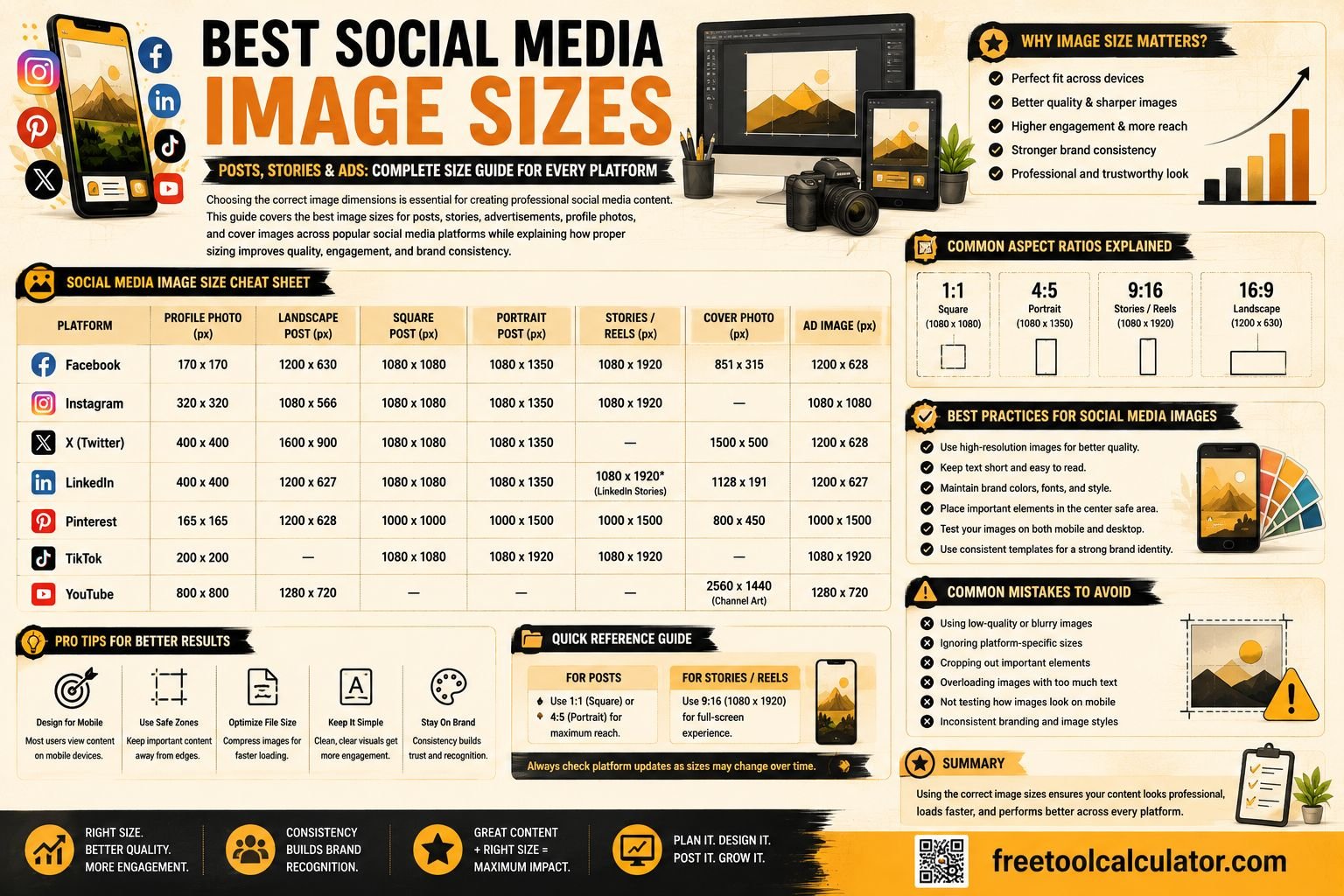
There is no single image size that works perfectly across every social media platform. Each platform recommends different dimensions depending on whether you’re uploading a feed post, story, advertisement, cover photo, or profile picture.
Some commonly used image dimensions include:
- Instagram Feed: 1080 × 1080 px
- Instagram Story: 1080 × 1920 px
- Facebook Post: 1200 × 630 px
- LinkedIn Post: 1200 × 627 px
- X (Twitter) Image: 1600 × 900 px
- Pinterest Pin: 1000 × 1500 px
Using these recommended dimensions helps preserve image quality while reducing unwanted cropping.
Why Social Media Image Size Matters
Image size affects much more than appearance. Properly optimized graphics improve readability, branding, user experience, and engagement.
Prevents Cropping
Incorrect dimensions often cause important text, logos, or product images to be cropped automatically. Following recommended sizes keeps your entire design visible.
Maintains Image Quality
Uploading images that closely match platform recommendations reduces unnecessary compression, resulting in sharper visuals.
Improves Engagement
High-quality images are generally more attractive to users, increasing the likelihood of likes, shares, comments, and click-throughs.
Supports Brand Consistency
Using standardized image dimensions helps maintain a professional appearance across all social media channels.
Understanding Aspect Ratios
Image dimensions are closely related to aspect ratio. The aspect ratio describes the relationship between an image’s width and height.
Common Aspect Ratios
| Aspect Ratio | Common Use |
|---|---|
| 1:1 | Square posts |
| 4:5 | Portrait feed posts |
| 16:9 | Landscape images and YouTube thumbnails |
| 9:16 | Stories, Shorts, and Reels |
| 2:3 | Pinterest Pins |
Choosing the correct aspect ratio before exporting your design minimizes automatic resizing by social media platforms.
Instagram Image Sizes
Instagram supports several image formats depending on where the content appears.
Instagram Feed Posts
| Post Type | Recommended Size |
|---|---|
| Square | 1080 × 1080 px |
| Portrait | 1080 × 1350 px |
| Landscape | 1080 × 566 px |
Portrait images typically occupy more screen space in users’ feeds, making them a popular choice for increasing visibility.
Instagram Stories
Recommended size:
1080 × 1920 pixels
Aspect ratio:
9:16
Keep important text and logos away from the top and bottom edges to avoid being covered by Instagram’s interface elements.
Instagram Profile Picture
- Recommended upload: 320 × 320 px
- Displayed as a circle
- Keep logos centered
Facebook Image Sizes
Facebook supports different image dimensions for feed posts, cover photos, profile images, and advertisements.
Facebook Feed Post
1200 × 630 pixels
Facebook Story
1080 × 1920 pixels
Facebook Cover Photo
851 × 315 pixels
Facebook Profile Picture
320 × 320 pixels
Although Facebook automatically resizes uploaded images, using recommended dimensions helps preserve image quality.
LinkedIn Image Sizes
LinkedIn is widely used for professional networking, making image quality especially important for businesses and personal brands.
| Content Type | Recommended Size |
|---|---|
| Feed Image | 1200 × 627 px |
| Profile Photo | 400 × 400 px |
| Company Logo | 300 × 300 px |
| Cover Banner | 1584 × 396 px |
Professional, high-resolution images help strengthen your personal and business branding on LinkedIn.
X (Twitter) Image Sizes
X supports landscape, portrait, and square images, although landscape images remain one of the most common formats.
| Content | Recommended Size |
|---|---|
| Feed Image | 1600 × 900 px |
| Profile Photo | 400 × 400 px |
| Header Image | 1500 × 500 px |
Optimizing your graphics for X ensures they display correctly in timelines and shared links without excessive cropping.
If you regularly create graphics for multiple platforms, our free Social Media Image Sizes tool makes it easy to find the correct dimensions. You may also find our Image Cropper Tool and Image Compressor useful for preparing images before uploading them to social media.
Pinterest Image Sizes
Pinterest is a highly visual search platform where image dimensions significantly impact visibility and engagement. Using the correct aspect ratio helps your Pins display properly in users’ feeds while reducing unwanted cropping.
Recommended Pinterest Image Sizes
| Content Type | Recommended Size |
|---|---|
| Standard Pin | 1000 × 1500 px |
| Square Pin | 1000 × 1000 px |
| Pinterest Profile Photo | 280 × 280 px |
| Board Cover | 600 × 600 px |
Vertical images generally perform better on Pinterest because they occupy more screen space in users’ feeds.
YouTube Image Sizes
YouTube creators should optimize thumbnails, banners, and profile images to improve branding and click-through rates.
Recommended YouTube Image Sizes
| Content Type | Recommended Size |
|---|---|
| Thumbnail | 1280 × 720 px |
| Channel Banner | 2560 × 1440 px |
| Profile Picture | 800 × 800 px |
Custom thumbnails with clear text, strong contrast, and high-quality visuals often improve video click-through rates.
TikTok Image Sizes
Although TikTok focuses primarily on video, profile images and promotional graphics should still follow recommended dimensions.
| Content Type | Recommended Size |
|---|---|
| Profile Photo | 200 × 200 px |
| Story Image | 1080 × 1920 px |
| Video Cover | 1080 × 1920 px |
Vertical content using a 9:16 aspect ratio provides the best viewing experience on TikTok.
Social Media Advertisement Image Sizes
Paid advertising platforms often support multiple image formats. Following recommended dimensions helps maximize ad quality and reduces automatic cropping.
| Platform | Recommended Ad Size |
|---|---|
| Facebook Ads | 1200 × 628 px |
| Instagram Feed Ads | 1080 × 1080 px |
| Instagram Story Ads | 1080 × 1920 px |
| LinkedIn Sponsored Content | 1200 × 627 px |
| Pinterest Ads | 1000 × 1500 px |
Using platform-recommended dimensions improves ad appearance and can contribute to better campaign performance.
Tips for Creating High-Quality Social Media Images
Use High-Resolution Graphics
Always start with the highest-quality image available. Larger images can be resized more effectively than low-resolution files.
Leave Safe Margins
Keep important text, logos, and buttons away from the edges of your design to prevent cropping across different devices.
Optimize File Size
Large image files may slow uploads or be compressed by social platforms. Compress images carefully without sacrificing noticeable quality.
Maintain Brand Consistency
Use consistent fonts, colors, and design elements across all platforms to strengthen brand recognition.
Choose the Correct File Format
- JPEG: Best for photographs.
- PNG: Ideal for graphics with text or transparent backgrounds.
- WebP: Offers excellent quality with smaller file sizes on supported platforms.
Common Mistakes to Avoid
Many creators unknowingly reduce image quality by making avoidable mistakes.
- Uploading low-resolution images.
- Using the same dimensions for every platform.
- Ignoring safe zones for Stories and Reels.
- Adding excessive text to graphics.
- Compressing images too aggressively.
- Stretching images instead of resizing proportionally.
A few simple adjustments can significantly improve the appearance of your content across multiple platforms.
Helpful Image Tools
Creating professional social media graphics becomes much easier when you use the right tools during your workflow.
- Social Media Image Sizes – Quickly find the recommended dimensions for major social platforms.
- Image Cropper Tool – Crop photos to the correct aspect ratio before uploading.
- Image Compressor – Reduce file size while maintaining image quality for faster uploads.
- PNG/JPG to WebP Converter – Convert images into efficient WebP format for better performance.
Frequently Asked Questions
What is the best image size for social media posts?
There is no single universal size. The ideal dimensions depend on the platform. For example, Instagram feed posts commonly use 1080 × 1080 pixels, while Facebook posts often use 1200 × 630 pixels.
Why do my social media images look blurry?
Images often become blurry when uploaded at low resolution or with incorrect dimensions. Using recommended image sizes and exporting high-quality files helps maintain clarity.
Can I use the same image for every platform?
Although you can reuse the same design, it’s best to resize it for each platform. Different aspect ratios may cause cropping or reduced image quality if one size is used everywhere.
What is the best aspect ratio for Stories?
Most platforms recommend a 9:16 aspect ratio with dimensions of 1080 × 1920 pixels for Stories, Reels, and other vertical content.
Should I compress images before uploading?
Yes. Compressing images helps reduce file size and improve loading speed. However, avoid excessive compression that noticeably reduces image quality.
Conclusion
Using the correct social media image dimensions helps your content appear professional, improves user experience, and reduces unwanted cropping across different devices. Every major platform has its own recommended sizes for posts, stories, profile pictures, advertisements, and cover images, making it important to optimize each graphic before publishing.
Instead of guessing dimensions every time you create content, use our free Social Media Image Sizes tool for quick reference. You can also improve your workflow with the Image Cropper Tool, Image Compressor, and PNG/JPG to WebP Converter to create high-quality, optimized graphics ready for every major social media platform.