Why Custom QR Codes Matter More Than Ever
QR codes have transformed from simple black-and-white squares into one of the most powerful marketing and communication tools available to businesses today. From restaurant menus and event registrations to product packaging and customer loyalty programs, QR codes have become a standard part of the customer journey.
The widespread adoption of smartphones has made QR codes more practical than ever. Customers no longer need specialized apps because most modern devices can scan QR codes directly through their native camera applications. This convenience has encouraged businesses of all sizes to incorporate QR technology into their marketing strategies.
However, as QR codes become more common, businesses face a new challenge: standing out. A plain black-and-white QR code may function perfectly, but it does little to reinforce brand identity. This is why many companies are turning to custom QR codes that incorporate logos, colors, and branded design elements.
The challenge is creating a QR code that looks professional while remaining highly scannable. A QR code that looks beautiful but fails to scan consistently will hurt user experience and reduce conversions. The most successful custom QR codes balance branding and functionality, creating a seamless experience that encourages users to engage.
The Biggest Mistake Businesses Make When Designing QR Codes
The most common mistake I see is over-designing.
Many businesses become obsessed with making their QR codes look unique. They add excessive colors, gradients, shadows, textures, and artistic effects in an attempt to create something memorable. Unfortunately, these design choices often compromise the code’s primary purpose.
A QR code is first and foremost a machine-readable tool. Its job is to scan quickly and accurately.
I have personally seen QR codes with heavy gradients and low-contrast color combinations that looked visually stunning on a designer’s screen but performed terribly in real-world conditions. The issue wasn’t the QR code technology itself. The problem was that scanners struggled to distinguish between the foreground and background elements.
Businesses should remember that aesthetics are secondary. A QR code that scans instantly will always outperform one that looks artistic but frustrates users.
What Makes a QR Code Look Professional?
Professional QR code design follows a set of proven principles that improve both usability and appearance.
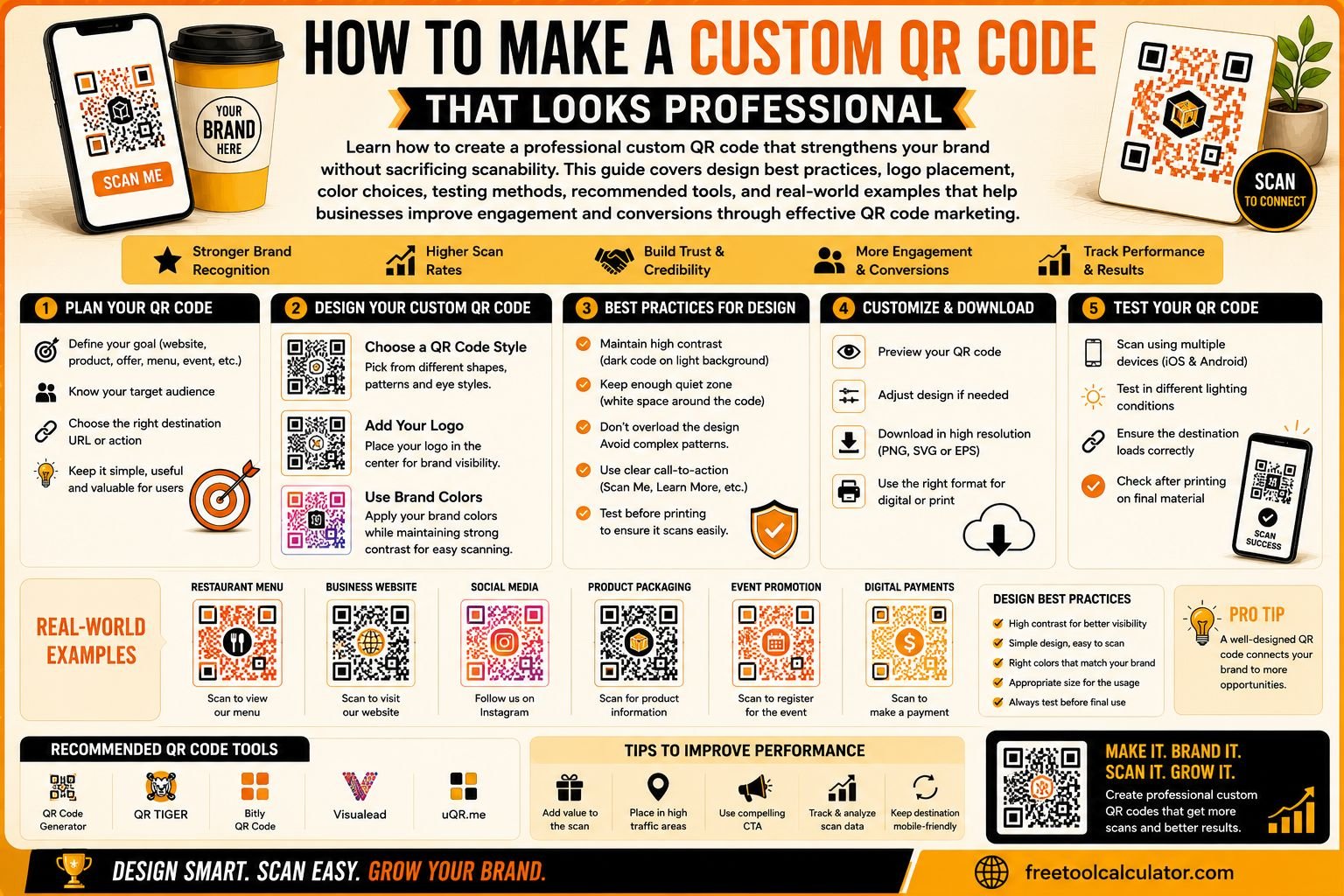
Maintain High Contrast
High contrast remains one of the most important factors in QR code design.
Dark foreground elements on a light background provide the best scanning performance. While brand colors can be incorporated, the contrast must remain strong enough for cameras to accurately recognize the pattern.
Preserve Quiet Space
Every QR code requires a margin of empty space around its perimeter. This area is known as the quiet zone.
Without sufficient quiet space, scanners may struggle to identify where the QR code begins and ends. Many businesses accidentally remove this space when placing QR codes inside crowded marketing materials.
Keep the Design Clean
Professional QR codes are typically simple and uncluttered. Small branding elements can enhance the appearance, but excessive customization often creates scanning issues.
Use Appropriate Error Correction
Modern QR codes include error correction technology that allows them to remain functional even when portions of the code are damaged or obscured.
This feature makes it possible to add logos and branding while maintaining reliability.
Should You Add a Logo to Your QR Code?
Adding a logo can significantly improve brand recognition.
A well-placed logo helps users immediately identify the company behind the QR code. This creates trust and often improves engagement rates because people feel more confident scanning something associated with a recognizable brand.
However, logo placement requires caution.
The logo should remain relatively small and should not interfere with the code’s critical data patterns. Oversized logos can reduce scan reliability and frustrate users.
One excellent example is Spotify. Their branded QR-style codes use recognizable visual elements while maintaining excellent functionality. The branding supports the experience without compromising performance.
When adding a logo:
- Keep it centered.
- Avoid oversized graphics.
- Test extensively.
- Maintain sufficient error correction.
The goal is subtle branding rather than visual dominance.
Using Brand Colors Correctly
Brand colors can make QR codes feel like a natural extension of your marketing materials.
However, color customization should always support scanability.
Good color choices include:
- Dark blue on white
- Dark green on white
- Black on light gray
- Deep brand colors on cream backgrounds
Poor color choices include:
- Light yellow on white
- Gradient overlays
- Transparent patterns
- Neon combinations
A professional QR code should immediately communicate your brand while remaining effortless to scan.
Static vs Dynamic QR Codes
Before creating a custom QR code, it is important to understand the difference between static and dynamic QR codes.
Static QR Codes
Static QR codes contain fixed information that cannot be edited after creation.
Benefits include:
- Free generation
- No recurring fees
- Permanent functionality
Limitations include:
- No tracking
- No editing
- No analytics
Dynamic QR Codes
Dynamic QR codes redirect users through a managed platform before sending them to the final destination.
Benefits include:
- Editable URLs
- Scan analytics
- Campaign tracking
- Better marketing insights
For businesses running active campaigns, dynamic QR codes often provide significantly greater value because they allow optimization after deployment.
Best Tools for Creating Professional QR Codes
Several platforms make it easy to create professional QR codes.
QR Code Monkey
QR Code Monkey remains one of the best free solutions available.
Features:
- Logo support
- Color customization
- High-resolution exports
- Vector downloads
- Print-ready files
Beaconstac
Beaconstac is ideal for businesses that need advanced marketing capabilities.
Features:
- Dynamic QR codes
- Analytics
- Campaign management
- Enterprise functionality
Both tools provide an excellent balance between customization and reliability.
Print vs Digital QR Codes
Many businesses assume that a QR code that works on a screen will automatically work in print. This assumption often leads to problems.
QR Codes for Print
Printed QR codes should:
- Use larger dimensions
- Include stronger error correction
- Be tested physically
- Use high-resolution exports
Physical environments introduce variables such as lighting conditions, wear and tear, and viewing distance.
QR Codes for Digital Campaigns
Digital QR codes are typically displayed through:
- Websites
- Email campaigns
- Social media posts
- Digital advertisements
While digital QR codes can often be smaller, they should still be tested across multiple devices and screen sizes.
How to Test a QR Code Before Launching
Testing is one of the most overlooked steps in QR code deployment.
Test Multiple Devices
Scan your QR code using:
- iPhones
- Android devices
- Tablets
Different cameras and operating systems may behave differently.
Test Multiple Applications
Use:
- Native camera apps
- Google Lens
- Third-party scanning tools
Test Different Lighting Conditions
Users may encounter your QR code:
- Indoors
- Outdoors
- Under bright sunlight
- In low-light environments
Testing under various conditions helps identify potential issues before launch.
Test Different Sizes
Print your QR code at actual production dimensions and verify performance before committing to large-scale printing.
Optimize the Destination Page Too
Many businesses spend hours perfecting their QR code design but completely overlook the landing page experience.
A QR code that scans instantly can still fail if the destination page loads slowly or performs poorly on mobile devices.
Website performance directly impacts user satisfaction and conversion rates. If your QR code directs users to a page with large image files, slow loading times, or poor mobile responsiveness, engagement will suffer.
Before launching a campaign, consider optimizing your digital assets using tools such as the PNG to WebP Converter:
This tool helps reduce image sizes while maintaining quality, resulting in faster-loading pages and better user experiences.
Industries Benefiting Most from QR Codes
Retail
Retailers use QR codes for:
- Product information
- Loyalty programs
- Promotions
- Customer reviews
Restaurants
Restaurants commonly use QR codes for:
- Digital menus
- Ordering systems
- Loyalty programs
- Customer feedback
Events
Event organizers use QR codes for:
- Ticket validation
- Registration
- Lead generation
- Networking
Healthcare
Healthcare organizations use QR codes for:
- Patient registration
- Appointment scheduling
- Digital forms
- Contactless check-ins
The versatility of QR technology makes it valuable across almost every industry.
Real-World Example: Coca-Cola’s Branded QR Campaign
One of the most successful examples of branded QR code marketing came from Coca-Cola.
During a campaign in Asia, Coca-Cola integrated branded QR codes directly onto product packaging. Instead of directing users to a standard landing page, the QR codes unlocked interactive augmented reality experiences.
The campaign generated engagement rates that exceeded traditional black-and-white QR code campaigns by more than 30 percent.
This success demonstrates that thoughtful branding can significantly improve performance when paired with meaningful customer experiences.
How to Measure QR Code Campaign Success
Creating a QR code is only the beginning. Businesses should actively monitor performance metrics.
Scan Rate
How many people scanned the code?
Click-Through Rate
How many users continued to the destination page?
Conversion Rate
How many users completed the desired action?
Geographic Insights
Where are scans occurring?
Device Analytics
Which devices generate the most engagement?
Tracking these metrics helps businesses improve future campaigns and maximize return on investment.
QR Codes and Video Marketing
Video content is increasingly becoming part of QR code campaigns. Many businesses now use QR codes to direct customers to product demonstrations, tutorials, event recordings, and promotional videos.
To improve user experience, videos should be optimized before being linked through QR codes. Large video files can create loading delays that reduce engagement.
Businesses can optimize video assets using:
Reducing video file sizes improves loading speed while maintaining acceptable visual quality.
The Most Overrated QR Code Design Trend
One trend I strongly believe is overrated is the rise of heavily artistic QR codes shaped like animals, hearts, products, and abstract objects.
These designs often prioritize appearance over functionality.
While they may attract attention initially, they frequently create scanning problems that frustrate users and reduce conversions.
The most successful QR codes are rarely the most artistic. They are the ones that scan reliably every single time.
A QR code’s purpose is to create a seamless user experience, not to win a design award.
The Future of Professional QR Codes
QR code adoption continues to expand across industries.
Future developments are likely to include:
- AI-driven personalization
- Advanced analytics
- Augmented reality integration
- Improved customer tracking
- CRM integrations
However, regardless of technological advancements, the fundamentals will remain unchanged.
A QR code must always be:
- Easy to scan
- Easy to understand
- Easy to trust
Final Thoughts
Creating a professional custom QR code is not about making it as creative as possible. It is about balancing branding, functionality, and user experience.
The best QR codes use strong contrast, maintain proper quiet zones, incorporate branding carefully, and undergo extensive testing before launch. They direct users to optimized landing pages and deliver meaningful value after the scan.
Whether you are using QR codes for retail, restaurants, healthcare, events, or marketing campaigns, remember that performance should always come first. A beautifully designed QR code that fails to scan is worthless. A clean, reliable QR code that works instantly will consistently generate better engagement, stronger customer experiences, and higher conversion rates.