IP Address Lookup Tool – Find City, State, Postal Code, ISP & Map Location and Introduction
An IP Address Lookup Tool helps users identify information associated with an IP address, including city, region, postal code, country, internet service provider (ISP), approximate coordinates, and map location. Every device connected to the internet uses an IP address to communicate with websites, servers, and online services. By performing an IP address lookup, users can gain insight into where internet traffic originates and which network provider is being used.
Many people search for how do I find my IP address, how to find IP address on computer, what is my local IP address, how to find printer IP address, or who owns IP address because IP addresses play an important role in networking, troubleshooting, security, and internet connectivity. Whether you are managing a home network, configuring a printer, troubleshooting Wi-Fi issues, or learning about internet technology, understanding IP addresses can be extremely useful.
This IP Address Lookup Tool allows users to check an IP address and view publicly available information such as location estimates, ISP details, region data, and network information. While IP lookups can provide useful geographic and network insights, they do not reveal precise personal information about individuals and should be used responsibly and legally.
What Is an IP Address?
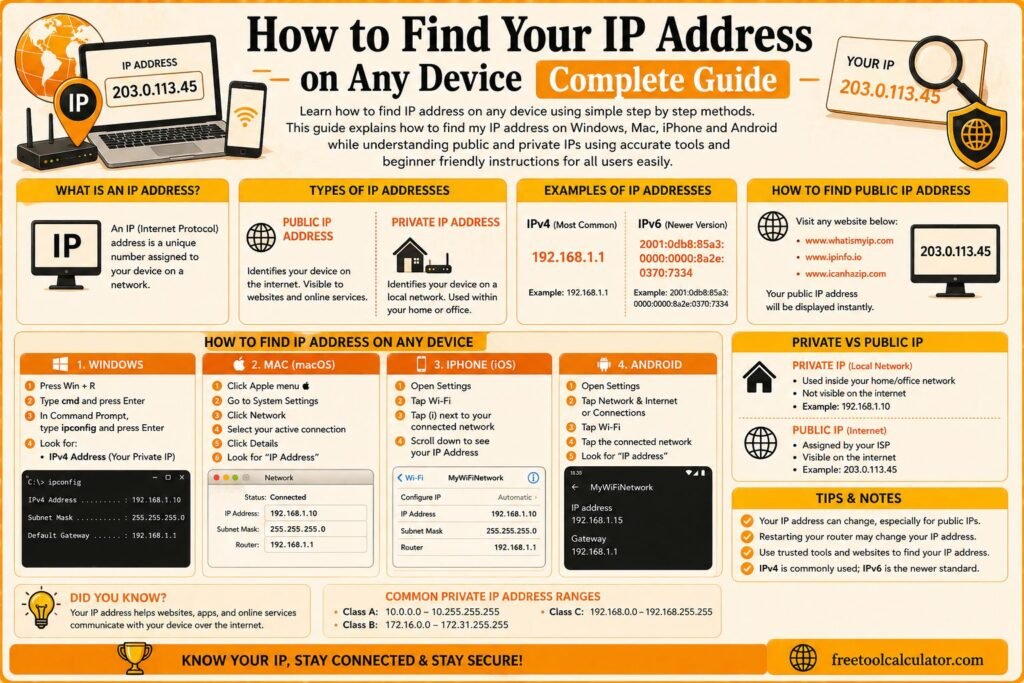
An IP address, short for Internet Protocol address, is a unique identifier assigned to a device connected to a network. It allows devices to send and receive data over the internet or a local network. Without IP addresses, computers, smartphones, routers, printers, websites, and servers would not be able to communicate effectively.
When users ask what does IP address stand for, the answer is Internet Protocol Address. It functions much like a mailing address for internet-connected devices. Instead of delivering physical mail, it helps route digital information to the correct destination.
Every time you visit a website, stream a video, send an email, or connect to an online service, IP addresses help direct the traffic between devices and servers.
What Does an IP Address Look Like?
One of the most common questions is what does an IP address look like. Most internet users encounter IPv4 addresses, which appear as four groups of numbers separated by periods, such as:
192.168.1.1
8.8.8.8
172.16.0.10
There is also IPv6, a newer format designed to support a much larger number of internet-connected devices. IPv6 addresses use letters and numbers separated by colons and appear much longer than IPv4 addresses.
Both IPv4 and IPv6 serve the same general purpose of identifying devices and routing network traffic.
How the IP Address Lookup Tool Works
Step 1: Enter an IP Address
Enter the IP address you want to investigate into the lookup tool. This may be your own IP address, a router address, server address, or another publicly accessible IP.
Step 2: Run the Lookup
The tool searches publicly available IP databases and network records associated with the address.
Step 3: Review Location Information
The results may display city, state, postal code, country, approximate coordinates, and ISP information connected to the IP address.
Step 4: Analyze Network Details
You can review ISP information, network ownership data, and other publicly available details that help identify the organization managing the IP address.
What Information Can an IP Address Lookup Show?
An IP address lookup can provide several types of information depending on the available data sources. The exact results vary by IP address and network provider.
- Country location
- State or region
- City information
- Postal or ZIP code estimates
- Internet service provider (ISP)
- Network organization
- Approximate geographic coordinates
- Map location estimates
- Autonomous System Number (ASN)
- Network ownership information
It is important to understand that IP geolocation data is usually approximate and may not represent a user’s exact physical location.
Public IP Addresses vs Local IP Addresses
Public IP Address
A public IP address is assigned by an internet service provider and is visible to websites and online services. This is the address used when connecting to the internet.
Local IP Address
A local IP address is assigned within a private network, such as a home or office network. Devices like computers, printers, phones, and smart TVs often use local IP addresses to communicate internally.
When users search for what is my local IP address, they are usually looking for the address assigned to their device within the local network rather than the public internet-facing address.
How to Find an IP Address on a Computer
Many users ask how to find IP address on computer, how do I find my computer’s IP address, how to locate IP address on my computer, or how to know the IP address of my computer. The process depends on the operating system being used.
On Windows, users can typically view IP information through network settings or command-line tools. On Mac, IP information is available through network preferences. Most operating systems provide built-in methods for viewing local and network IP addresses.
Knowing your computer’s IP address can help with troubleshooting network problems, configuring devices, setting up remote access, or connecting to shared resources.
How to Find an IP Address on Mac
Mac users often search for how to find IP address on Mac, how to find IP address of a Mac, how to check IP address on Mac, or how to find the IP address in Mac. Apple devices provide network information through system settings and network preferences.
The IP address displayed may be a local network address assigned by the router or another network device. This information can be useful when troubleshooting connectivity problems or configuring local network services.
Mac users can also identify network settings for Wi-Fi, Ethernet, VPN connections, and other network interfaces from the same area.
How to Find an IP Address on iPhone
Many users search for how to find IP address on iPhone, how do I find my iPhone IP address, or how do I find my IP address on my iPhone. iPhones display network information through Wi-Fi settings.
The address shown is typically the local IP assigned by the router while connected to a wireless network. This information may be useful when troubleshooting Wi-Fi issues or connecting to network devices.
Different networks may assign different local IP addresses to the same device depending on network configuration and settings.
How to Find a Router IP Address
Users frequently search for how to find my router IP address, how do I find my router’s IP address, what is my IP address for my router, or how can I find out my router IP address. Routers typically have a default gateway address used to access administrative settings.
The router IP address acts as the central communication point between devices on the local network and the internet. Accessing the router interface allows users to manage Wi-Fi settings, passwords, security options, and network configurations.
Router IP addresses commonly use private address ranges such as 192.168.x.x or 10.x.x.x, although exact values vary by manufacturer and network setup.
How to Find a Printer IP Address
Network printers often have their own IP addresses so computers and devices can communicate with them. Users frequently search for how to find printer IP address, how to check printer IP address, how to identify printer IP address, or where to find IP address on printer.
Printer IP addresses can usually be found through the printer’s control panel, network settings page, router administration panel, or device management software. Some printers can also print a network configuration page that displays IP information.
Knowing the printer IP address is useful when installing printers, troubleshooting printing issues, or configuring network printing features.
How to Find a Roku IP Address
Roku devices also use IP addresses when connected to a network. Users often search for how to find Roku IP address, how do I find the Roku IP address, or where to find Roku IP address.
The Roku IP address can help with troubleshooting, remote control applications, network diagnostics, and streaming device management. In most cases, the information can be viewed through network settings on the device or through the router’s connected device list.
Even if a Roku remote is unavailable, network management tools may help identify the device on the network.
What Is a Static IP Address?
A static IP address is an address that remains consistent over time rather than changing periodically. Businesses, servers, network equipment, and some advanced home network setups may use static IP addresses because they provide predictable connectivity.
When users ask what is a static IP address, they are usually comparing it with dynamic IP addresses. Dynamic IP addresses are assigned automatically and may change periodically, while static addresses remain fixed unless manually modified.
Static IP addresses are often used for hosting services, remote access, network management, and business infrastructure.
Does an IP Address Change?
Many people ask does IP address change, can I change my IP address, or can you change your IP address. The answer depends on the type of IP address being used and how the network is configured.
Most residential internet connections use dynamic IP addresses assigned by internet service providers. These addresses may change periodically due to network updates, modem resets, provider policies, or other factors.
Local network addresses can also change as devices reconnect to networks or receive new assignments from routers.
Does a VPN Change Your IP Address?
One of the most common questions is does VPN change IP address. In most situations, a VPN routes internet traffic through a VPN server, causing websites and online services to see the VPN server’s IP address rather than the user’s original public IP address.
This can improve privacy, help protect internet traffic, and provide additional security when using public networks. However, VPN services differ in features, policies, and configurations.
Users should understand that changing a visible IP address does not make online activity completely anonymous, and other factors may still be used for identification.
How to Change an IP Address
Users often search for how can I change my IP address, how do I change my IP address, how to modify IP address, or how to get a new IP address. There are several legitimate reasons for changing an IP address, including troubleshooting connectivity issues, network reconfiguration, or privacy concerns.
Depending on the situation, changing an IP address may involve reconnecting to a network, restarting networking equipment, requesting changes from an ISP, using a VPN, or adjusting local network settings.
The exact process depends on the type of address being changed and the device involved.
How to Ping an IP Address
Network administrators and users often search for how to ping an IP address or how do I ping IP address. Pinging is a network diagnostic technique used to test whether a device or server is reachable over a network.
A ping request sends data packets to a target address and measures whether responses are received. It can help diagnose connectivity problems, network latency, and device availability.
While pinging is a useful troubleshooting tool, some devices and servers intentionally block ping requests for security reasons.
Who Owns an IP Address?
Another common question is who owns IP address. IP addresses are allocated through regional internet registries and then assigned to internet service providers, businesses, organizations, governments, hosting companies, and other entities.
IP address ownership information may be available through public registration databases. An IP lookup can often identify the organization responsible for managing a particular IP address block.
Ownership information generally identifies organizations rather than individual users.
Can You Track Someone Using an IP Address?
Users often ask how to track from IP address, how to find someone’s IP address, or how to find out someone’s IP address. It is important to understand that IP addresses typically reveal limited information.
An IP lookup may provide approximate geographic information such as city, region, country, and ISP. However, it generally does not reveal a person’s exact address, identity, or precise location. Accessing private information about individuals without authorization may violate laws, privacy regulations, or service policies.
IP lookup tools should be used responsibly for legitimate network, security, educational, or troubleshooting purposes.
Understanding Related Networking Concepts
IPv4
IPv4 is the traditional internet addressing system and remains widely used today. Most IP addresses people encounter use IPv4 format.
IPv6
IPv6 was developed to address the growing number of internet-connected devices. It supports significantly more addresses than IPv4.
ISP
An Internet Service Provider supplies internet connectivity and often assigns public IP addresses to customers.
DNS
Domain Name System servers translate website names into IP addresses, allowing users to access websites using readable domain names instead of numerical addresses.
Default Gateway
The default gateway is usually the router address responsible for directing traffic between local devices and external networks.
Who Uses IP Address Lookup Tools?
- Network administrators.
- IT support professionals.
- Cybersecurity teams.
- Website administrators.
- Business network managers.
- Students learning networking concepts.
- Home users troubleshooting internet issues.
- Printer and device administrators.
- Developers and hosting professionals.
- Internet users investigating network information.
Benefits of Using an IP Address Lookup Tool
- Quickly identify geographic IP information.
- View ISP and network ownership details.
- Assist with troubleshooting network issues.
- Help verify server or network locations.
- Improve understanding of internet infrastructure.
- Support security and monitoring activities.
- Provide map-based location estimates.
- Help identify network providers.
- Useful for educational purposes.
- Simple and accessible for beginners.
Common Mistakes When Interpreting IP Address Data
Assuming Exact Location Accuracy
IP geolocation data is often approximate and may not represent a user’s exact physical location. Results should be viewed as estimates.
Confusing Local and Public IP Addresses
Local network addresses and public internet addresses serve different purposes. Understanding the distinction is important for troubleshooting.
Expecting Personal Identity Information
IP lookups typically provide network-level information rather than private personal details about individuals.
Ignoring Dynamic IP Assignment
Many internet providers assign dynamic addresses that may change over time. The same user may not always have the same IP address.
Using IP Data Without Context
Location estimates, ISP information, and ownership data should be interpreted carefully because network configurations can affect results.
Frequently Asked Questions
How do I find my IP address?
You can usually find your IP address through your device’s network settings or by using an IP lookup tool. Most operating systems display local network addresses, while online tools can show public IP addresses.
How do I find my computer’s IP address?
Computers display IP information through network settings and diagnostic tools. The exact steps depend on the operating system being used.
How do I find my router IP address?
The router IP address is often listed as the default gateway within network settings. It can also be found in router documentation or device management interfaces.
How do I find the IP address of my printer?
Printer IP addresses can usually be viewed through printer network settings, router device lists, or printed network configuration pages.
How do I find an IP address on Mac?
Mac devices provide IP information through network settings and system preferences. Users can view Wi-Fi and Ethernet connection details from these menus.
How do I find my iPhone IP address?
iPhones display local IP information through Wi-Fi settings. The address shown is generally the local address assigned by the connected network.
Does a VPN change your IP address?
In most situations, a VPN changes the public IP address visible to websites by routing traffic through a VPN server.
Can I change my IP address?
Depending on the network setup, IP addresses can often be changed through network reconfiguration, ISP assignment changes, VPN usage, or other legitimate methods.
What is a static IP address?
A static IP address remains fixed over time and does not automatically change like many dynamic IP addresses.
How do I ping an IP address?
Pinging involves sending a network request to a device or server to determine whether it is reachable and responding to network traffic.
Who owns an IP address?
IP addresses are assigned through internet registries and managed by organizations such as ISPs, businesses, hosting providers, and other entities.
Can I find someone’s exact location using an IP address?
IP addresses generally provide approximate location information rather than precise personal location data. Exact addresses and personal identities are not typically available through standard IP lookup services.
Why Trust This Tool?
This IP Address Lookup Tool uses publicly available network and geolocation information to help users understand IP address ownership, ISP details, geographic estimates, and related networking data. The information presented is intended for educational, troubleshooting, administrative, and informational purposes.
The explanations on this page follow commonly accepted networking concepts used throughout the internet and technology industries. While IP geolocation databases can provide useful insights, location information should always be treated as approximate rather than exact.
This tool is designed to help users better understand IP addresses, networking fundamentals, internet connectivity, and network management without requiring advanced technical knowledge.
Get Started Today
Use this IP Address Lookup Tool to check any IP address and view city, state, postal code, country, ISP information, coordinates, and map location estimates. Whether you want to find your IP address, identify a printer IP address, locate a router IP address, learn about static IP addresses, or investigate network ownership information, this tool provides quick and accessible results.
Simply enter an IP address, run the lookup, and review the available network information. From troubleshooting home networks to learning about internet infrastructure, an IP address lookup can provide valuable insights into how devices connect and communicate online.