Crop Image Online and Why It Is Important
Learning how to crop image online is an essential skill for anyone working with digital content, whether for social media, websites, or personal use. Cropping helps remove unwanted areas, improve composition, and focus on the most important part of an image. A well cropped image looks more professional and visually appealing, making it more effective for communication and design.
With the availability of online tools, cropping images has become faster and easier than ever. You no longer need advanced software or design skills. You can simply upload your image, adjust the crop area, and download the result. You can crop image online using this free crop image tool and get precise results instantly without installing any software.
What Does It Mean to Crop an Image
Cropping an image means removing the outer parts of a picture to improve its framing or composition. This process helps eliminate distractions and highlight the subject. It is commonly used in photography, graphic design, and content creation.
When you crop images free, you can adjust the dimensions and aspect ratio according to your needs. This is especially useful for social media platforms, where specific image sizes are required.
Understanding the purpose of cropping helps you use the tool effectively and achieve better visual results. It is a simple technique that can significantly enhance the quality of your images.
How to Crop Image Online Step by Step
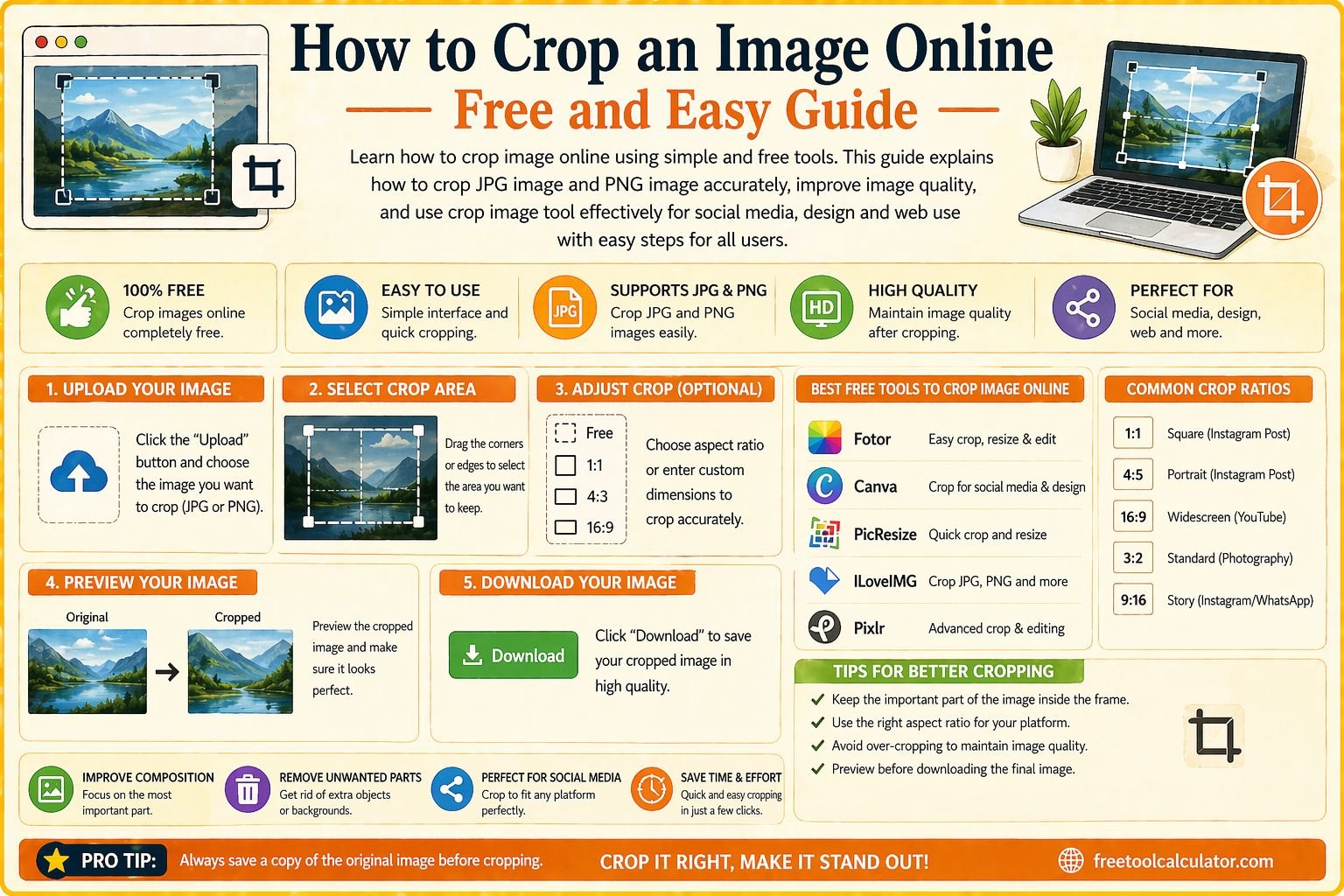
Cropping an image online is a straightforward process that anyone can follow. First, open an online crop image tool and upload your image. Most tools support formats such as JPG and PNG.
Next, select the crop area by dragging the edges of the frame. You can adjust the size and position to focus on the desired part of the image. Many tools also allow you to choose preset aspect ratios for different platforms.
Once you are satisfied with the selection, click the crop button and download the edited image. You can use this crop image online tool to perform these steps quickly and accurately.
How to Crop JPG Image Easily
Cropping a JPG image is one of the most common tasks in image editing. JPG files are widely used because they offer a good balance between quality and file size.
To crop jpg image, upload the file to an online tool and follow the same steps as mentioned earlier. Adjust the crop area to remove unwanted sections and save the final image.
Ensuring the correct dimensions is important, especially when using images for websites or social media. Proper cropping improves both appearance and usability.
How to Crop PNG Image Without Losing Quality
PNG images are often used for graphics and transparent backgrounds. Cropping PNG images requires maintaining quality and transparency.
When you crop png image, make sure the tool supports transparency to avoid losing important elements. Adjust the crop area carefully to preserve the design.
Using a reliable crop image tool ensures that your PNG images remain sharp and clear after editing. This is especially important for logos and design elements.
Benefits of Using a Crop Image Tool Online
Using an online crop image tool offers several advantages. It is quick, easy, and does not require installation. This makes it accessible from any device with an internet connection.
Online tools also provide precise controls, allowing you to adjust the crop area accurately. This ensures that you get the desired result every time.
Additionally, these tools are free and user friendly, making them suitable for beginners and professionals alike. You can also enhance your images further using an image compressor to reduce file size without losing quality.
Common Mistakes When Cropping Images
One common mistake is cropping too much of the image, which can remove important details. It is important to maintain a balance between focusing on the subject and preserving context.
Another mistake is ignoring aspect ratio. Different platforms require specific dimensions, and incorrect ratios can lead to distorted images.
Poor alignment is another issue. Ensure that the subject is properly centered or aligned according to design principles. Avoiding these mistakes helps you achieve better results.
How to Choose the Right Aspect Ratio
Aspect ratio plays a crucial role in image cropping. It determines the relationship between width and height. Common ratios include 1 to 1 for square images, 16 to 9 for widescreen, and 4 to 5 for social media posts.
Choosing the right ratio ensures that your image fits perfectly on the intended platform. It also improves visual consistency and professionalism.
You can use tools like a social media size guide tool to find the correct dimensions for different platforms and optimize your images accordingly.
Advanced Tips to Improve Image Cropping
To achieve better results, follow basic composition rules such as the rule of thirds. This technique helps create balanced and visually appealing images.
Pay attention to lighting and focus when cropping. Removing unnecessary elements can enhance the overall quality of the image.
Experiment with different crop styles to find the best fit for your content. This helps you develop a better understanding of visual design.
How Cropping Helps in SEO and Web Performance
Properly cropped images can improve website performance and SEO. Smaller, optimized images load faster, enhancing user experience and search engine rankings.
Cropping also ensures that images are relevant and focused, which improves engagement. Visitors are more likely to interact with clear and visually appealing content.
Combining cropping with optimization tools ensures that your images are both high quality and efficient. This contributes to better overall website performance.
Using Multiple Tools for Better Results
For best results, combine cropping with other image editing tools. After cropping, you can compress the image to reduce file size or adjust colors for better appearance.
Using multiple tools helps you achieve a complete editing process and ensures professional quality results. This approach is especially useful for content creators and designers.
Integrating different tools into your workflow improves efficiency and saves time.
Conclusion Crop Image Online Easily and Effectively
Learning how to crop image online is a simple yet powerful skill that improves the quality of your images. Whether you are working with JPG or PNG files, using the right tools ensures accurate and professional results.
If you want quick and precise editing, you can use this free crop image tool along with other tools to enhance your images. Combining cropping with optimization techniques ensures better visuals and improved performance for all your digital content.