How a Sleep Cycle Calculator helps you plan better sleep
A Sleep Cycle Calculator is designed to help you align your bedtime and wake-up time with your natural 90-minute sleep cycles so you wake up feeling more alert and less groggy. Instead of only counting total hours in bed, sleep cycle timing focuses on how the brain moves through repeating stages of light sleep, deep sleep, and REM sleep. In this guide, you will learn how to calculate your wake-up time using the standard 90-minute sleep cycle model, whether five or six full cycles are better for high-performance cognitive function, how to choose the best fall-asleep windows if you must wake at 6:00 AM, how sleep calculators account for sleep latency, and how they help reduce sleep inertia. These methods are based on established sleep physiology and practical sleep scheduling strategies.
Understanding the standard 90 minute sleep cycle
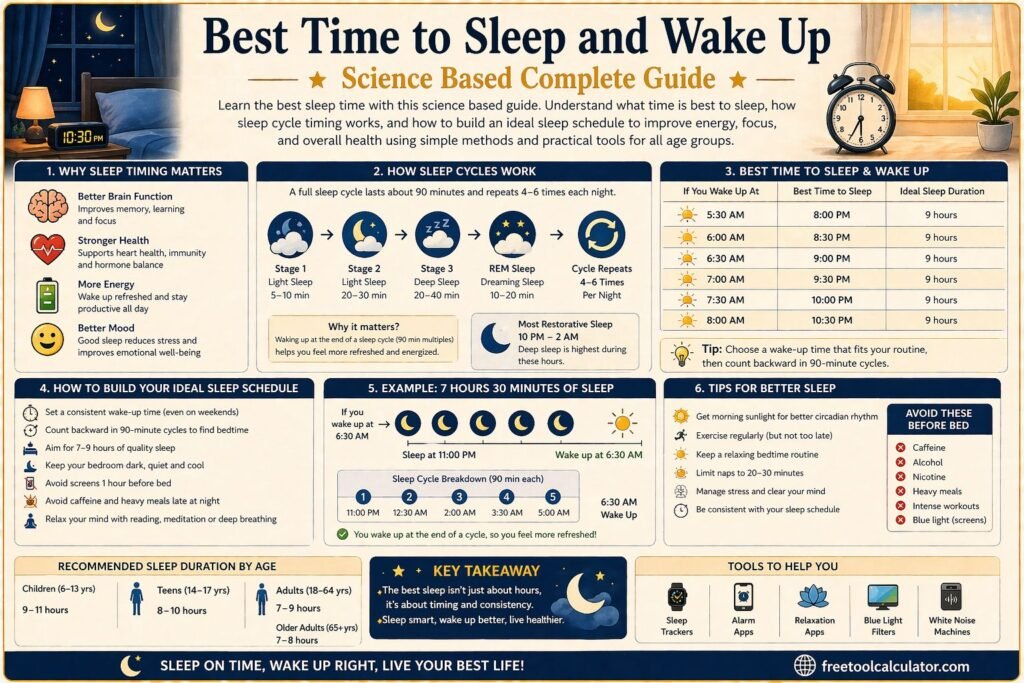
Human sleep is organized into repeating cycles rather than one continuous state. Each cycle lasts about 90 minutes on average, although real biological cycles can range from roughly 80 to 110 minutes depending on the individual and the night.
Each sleep cycle contains multiple stages. It begins with light sleep, progresses into deeper slow-wave sleep, and then enters REM sleep, which is strongly associated with memory consolidation and emotional regulation. After REM, the brain transitions back toward lighter sleep and begins the next cycle.
Waking up at the end of a cycle, when sleep is lighter, is usually easier for the brain and body. Waking up in the middle of deep sleep is strongly associated with grogginess, confusion, and reduced reaction speed. That is why sleep timing based on cycles can feel very different from simply sleeping a fixed number of hours.
How to calculate your wake-up time using 90 minute sleep cycles
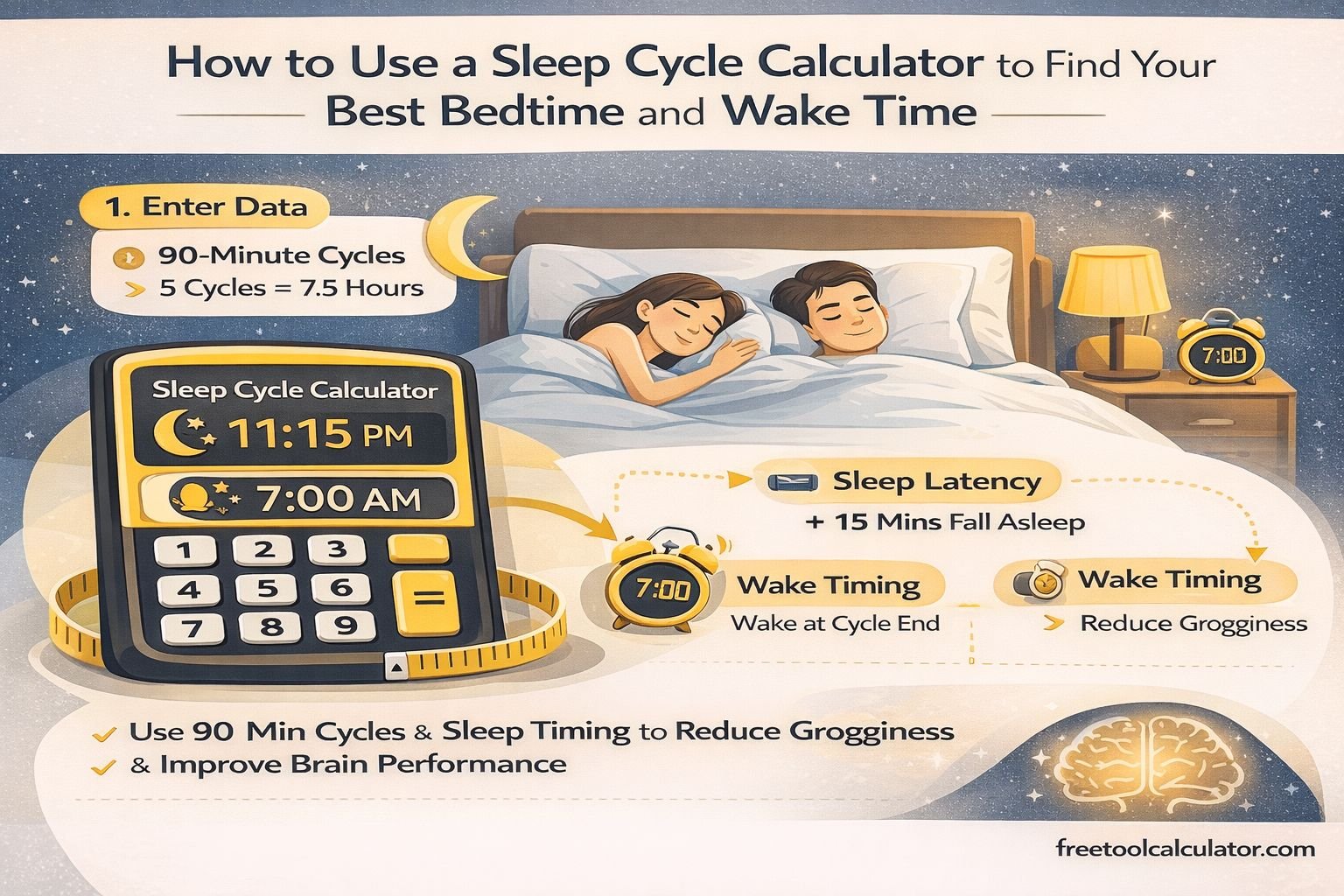
To calculate your wake-up time using the 90-minute cycle model, you count forward in blocks of 90 minutes from your estimated sleep onset time, not from when you get into bed.
A practical formula is:
Bedtime plus sleep latency plus (90 minutes × number of cycles) equals wake time.
Most adults function best with 5 or 6 full sleep cycles. That equals:
5 cycles = about 7.5 hours of actual sleep
6 cycles = about 9 hours of actual sleep
Because most people do not fall asleep instantly, sleep planners add an average sleep latency buffer, commonly about 10 to 20 minutes. A Sleep Cycle Calculator automatically adds this buffer so your wake time is based on actual sleep, not just time in bed.
For example, if you fall asleep around 11:00 PM and complete 5 cycles:
11:00 PM plus 7.5 hours brings you close to 6:30 AM.
With a 15-minute latency adjustment, you would plan slightly earlier.
Is 5 or 6 sleep cycles better for high performance cognitive function
Both five and six full sleep cycles can support healthy brain function, but they serve slightly different performance goals.
Five cycles, about 7.5 hours, is often sufficient for many adults to maintain attention, working memory, and decision-making ability during a normal day. This is frequently considered the practical minimum for consistent cognitive performance.
Six cycles, about 9 hours, generally provides additional benefit for people under heavy mental load, athletes, students during exams, and individuals recovering from sleep debt. Extra REM sleep in later cycles supports learning, creativity, and emotional regulation.
Research in sleep science consistently shows that chronic restriction below five cycles reduces reaction time, increases error rates, and weakens executive function. Therefore, for high-performance cognitive output, six cycles is usually superior when schedule allows, while five cycles is acceptable and far better than four or fewer.
If you must wake at 6:00 AM the best fall asleep windows
If your fixed wake-up time is 6:00 AM, you count backward in 90-minute blocks and then add sleep latency allowance. Assuming about 15 minutes to fall asleep, the best target sleep onset windows are:
For 6 cycles (about 9 hours of sleep)
Sleep onset around 8:45 PM
Get into bed about 8:30 PM
For 5 cycles (about 7.5 hours of sleep)
Sleep onset around 10:15 PM
Get into bed about 10:00 PM
For 4 cycles (about 6 hours of sleep, short-term only)
Sleep onset around 11:45 PM
Get into bed about 11:30 PM
These three windows are considered the most practical options. A Sleep Cycle Calculator computes these times instantly and adjusts them based on cycle count and latency so you do not need to calculate manually.
How sleep calculators account for sleep latency
Sleep latency is the time between trying to sleep and actually falling asleep. For most healthy adults, average sleep latency is about 10 to 20 minutes. It can be shorter in sleep-deprived individuals and longer in people with insomnia or high stress.
If a calculator ignored sleep latency, all recommended wake times would be shifted too early, causing people to wake in the middle of a cycle. That reduces accuracy and increases morning grogginess.
A well-designed sleep tool, such as a Sleep Cycle Calculator, automatically adds a default latency buffer, commonly 15 minutes. Some advanced models allow users to adjust this number based on personal experience. This makes the predicted wake-up points better aligned with actual brain sleep stages.
Can a sleep cycle calculator help prevent sleep inertia
Sleep inertia is the heavy, foggy feeling many people experience after waking, especially when awakened from deep slow-wave sleep. It can impair alertness, coordination, mood, and decision-making for up to an hour in some cases.
Sleep inertia risk is strongly linked to waking at the wrong point in the sleep cycle. When you wake near the end of a cycle, sleep is lighter and the brain transitions faster to alertness. When you wake in the middle of deep sleep, inertia is stronger.
A Sleep Cycle Calculator reduces the probability of sleep inertia by targeting wake times that fall near cycle boundaries. While it cannot guarantee perfect timing every day because biological cycles vary, it significantly improves the odds compared with random alarm timing.
Additional strategies that work well with cycle-based timing include immediate light exposure, light movement after waking, and consistent daily schedules.
Practical limits of sleep cycle calculations
Sleep cycle calculators are based on averages, not real-time brain monitoring. Individual cycle length varies nightly based on stress, illness, alcohol use, and prior sleep debt. Therefore, these calculators are best viewed as probability tools, not exact predictors.
They work best when combined with consistent bedtimes, reduced late-night screen exposure, and stable wake times. Over several weeks, users often notice that cycle-aligned wake times feel easier and more refreshing.
Final conclusion on using a Sleep Cycle Calculator
A Sleep Cycle Calculator is a practical, science-based planning tool that uses the average 90-minute sleep cycle model to recommend better bedtimes and wake-up times. By counting full cycles instead of only total hours, it helps reduce sleep inertia, improve morning alertness, and support cognitive performance. Five cycles is generally the minimum for stable mental function, while six cycles better supports high-demand brain performance. By accounting for sleep latency and working backward from fixed wake times like 6:00 AM, a Sleep Cycle Calculator turns sleep timing into a structured, repeatable strategy rather than guesswork.