Check Screen Time and Why It Is Important Today
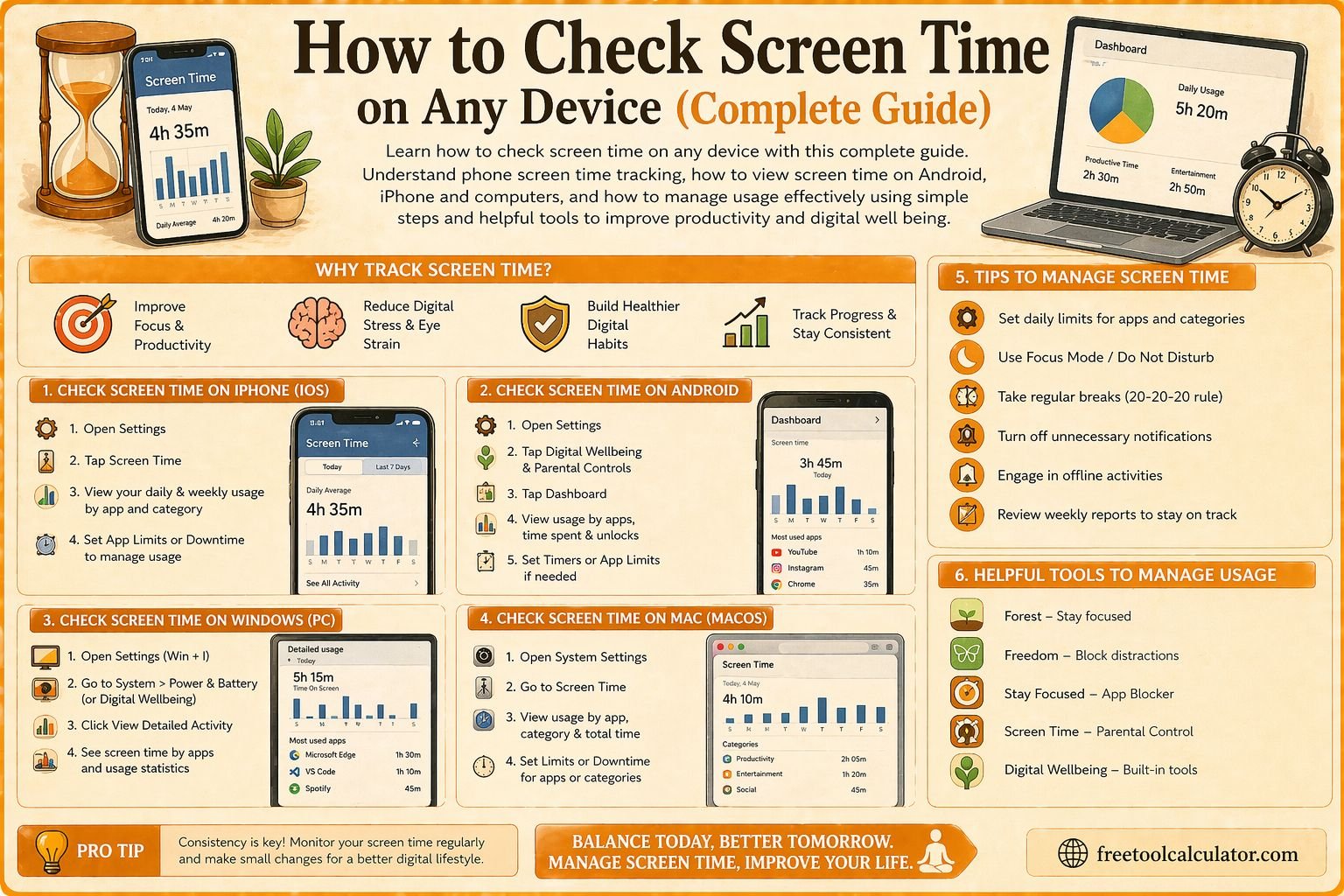
Knowing how to check screen time has become increasingly important in today’s digital world where smartphones, computers, and tablets are used throughout the day. Screen time refers to the amount of time you spend using your devices, including browsing, social media, gaming, and work related tasks. Tracking this usage helps you understand your habits and make better decisions about how you spend your time.
Excessive screen time can impact productivity, sleep quality, and even mental health. By learning how to check screen time regularly, you gain control over your digital lifestyle. You can also use a screen time impact tool to understand how your usage affects your health and daily routine.
How to Check Screen Time on Android Devices
If you are using an Android device, checking screen time is simple through the Digital Wellbeing feature. Open your device settings and look for Digital Wellbeing and parental controls. This section shows your daily screen time, app usage, and how often you unlock your phone.
You can view detailed insights into how much time you spend on each app. This helps identify patterns and areas where you may want to reduce usage. Android also allows you to set app timers to limit usage and improve productivity.
Understanding phone screen time on Android helps you build healthier habits and manage your time more effectively.
How to Check Screen Time on iPhone
iPhone users can check screen time using the Screen Time feature available in settings. Open settings and tap on Screen Time to view your daily and weekly usage reports. This feature provides a breakdown of app usage, notifications, and device pickups.
You can also set limits for specific apps or categories, such as social media or entertainment. This helps reduce distractions and improve focus. Screen Time on iPhone also allows parents to monitor and control their children’s device usage.
Learning how to check screen time on iPhone gives you better control over your digital habits and helps maintain a balanced lifestyle.
How to Check Screen Time on Windows and Mac
Checking screen time on computers is equally important, especially for people who work or study online. On Windows, you can use built in tools or third party apps to track usage. Microsoft Family Safety also provides screen time tracking features.
On Mac, the Screen Time feature is available in system settings. It works similarly to iPhone and provides detailed insights into your usage patterns. You can view how much time you spend on different apps and websites.
Tracking screen time on computers helps you manage work hours, reduce distractions, and maintain productivity.
How Do You Check Screen Time Across Multiple Devices
Many people use multiple devices throughout the day, making it important to track screen time across all platforms. Some ecosystems, such as Apple, allow you to sync screen time data across devices using the same account.
This provides a complete overview of your usage and helps you identify patterns. For example, you may spend less time on your phone but more on your laptop, which still contributes to overall screen time.
Using integrated tools ensures that you get an accurate picture of your digital habits and can make informed decisions.
Understanding Phone Screen Time Data
When you check screen time, you will see various metrics such as total usage time, app usage, pickups, and notifications. Each of these provides valuable insights into your behavior.
Total usage time shows how much time you spend on your device daily. App usage highlights which apps consume most of your time. Pickups indicate how often you check your phone, while notifications show how frequently you are interrupted.
Understanding these metrics helps you identify areas for improvement and develop healthier digital habits.
Benefits of Tracking Screen Time
Tracking screen time offers several benefits for both productivity and health. It helps you become more aware of how you spend your time and encourages better time management.
Reducing excessive screen time can improve sleep quality, as prolonged exposure to screens before bedtime can disrupt sleep patterns. It also helps reduce stress and improve mental well being.
By regularly checking screen time, you can make adjustments to your routine and achieve a better balance between digital and offline activities.
Common Mistakes When Checking Screen Time
One common mistake is checking screen time without taking action. Simply viewing your usage data is not enough; you need to use the insights to make meaningful changes.
Another mistake is focusing only on total screen time without considering the type of usage. For example, work related screen time may be necessary, while excessive social media use may need to be reduced.
Ignoring long term patterns is another issue. Tracking trends over time provides more useful insights than looking at daily data alone.
How to Reduce Screen Time Effectively
Reducing screen time requires a combination of awareness and discipline. Start by setting daily limits for non essential apps. This helps you control usage and avoid distractions.
Creating screen free zones, such as during meals or before bedtime, can also improve your habits. Replacing screen time with physical activities or hobbies helps maintain balance.
You can use tools like a sleep calculator to improve your sleep schedule and reduce late night device usage. This supports overall health and well being.
Advanced Tips to Manage Digital Usage
To manage screen time effectively, consider using features like focus modes or do not disturb settings. These tools help reduce interruptions and improve concentration.
Scheduling regular breaks from screens is also important, especially for people who work long hours on computers. This reduces eye strain and improves productivity.
Tracking your progress over time helps you stay motivated and maintain healthy habits. Combining multiple strategies ensures better results.
How Screen Time Affects Health and Productivity
Excessive screen time can have negative effects on both physical and mental health. It can lead to eye strain, poor posture, and reduced physical activity.
From a productivity perspective, constant notifications and distractions can reduce focus and efficiency. Managing screen time helps improve concentration and overall performance.
Understanding these impacts encourages you to take control of your digital habits and make healthier choices.
Conclusion How to Check Screen Time and Take Control
Learning how to check screen time is the first step toward managing your digital lifestyle effectively. By understanding your usage patterns and making necessary adjustments, you can improve productivity, health, and overall well being.
If you want deeper insights into how screen usage affects your life, you can use a screen time impact tool to analyze your habits. Taking control of your screen time ensures a balanced and healthier lifestyle in today’s digital world.