Find IP Address and Why It Matters
Learning how to find IP address information is one of the most useful networking skills for internet users today. Every device connected to the internet has an IP address, including smartphones, laptops, tablets, gaming consoles, and smart TVs. This unique address allows devices to communicate with websites, servers, routers, and apps across networks.
Understanding how to find my IP address is useful for troubleshooting internet problems, configuring routers, setting up gaming servers, improving online privacy, and managing remote work connections. While many users ignore networking basics, understanding IP addresses gives you more control over your devices and internet connection.
You can instantly find your IP address using this free IP checker tool without opening complicated network settings or technical software.
What Is an IP Address
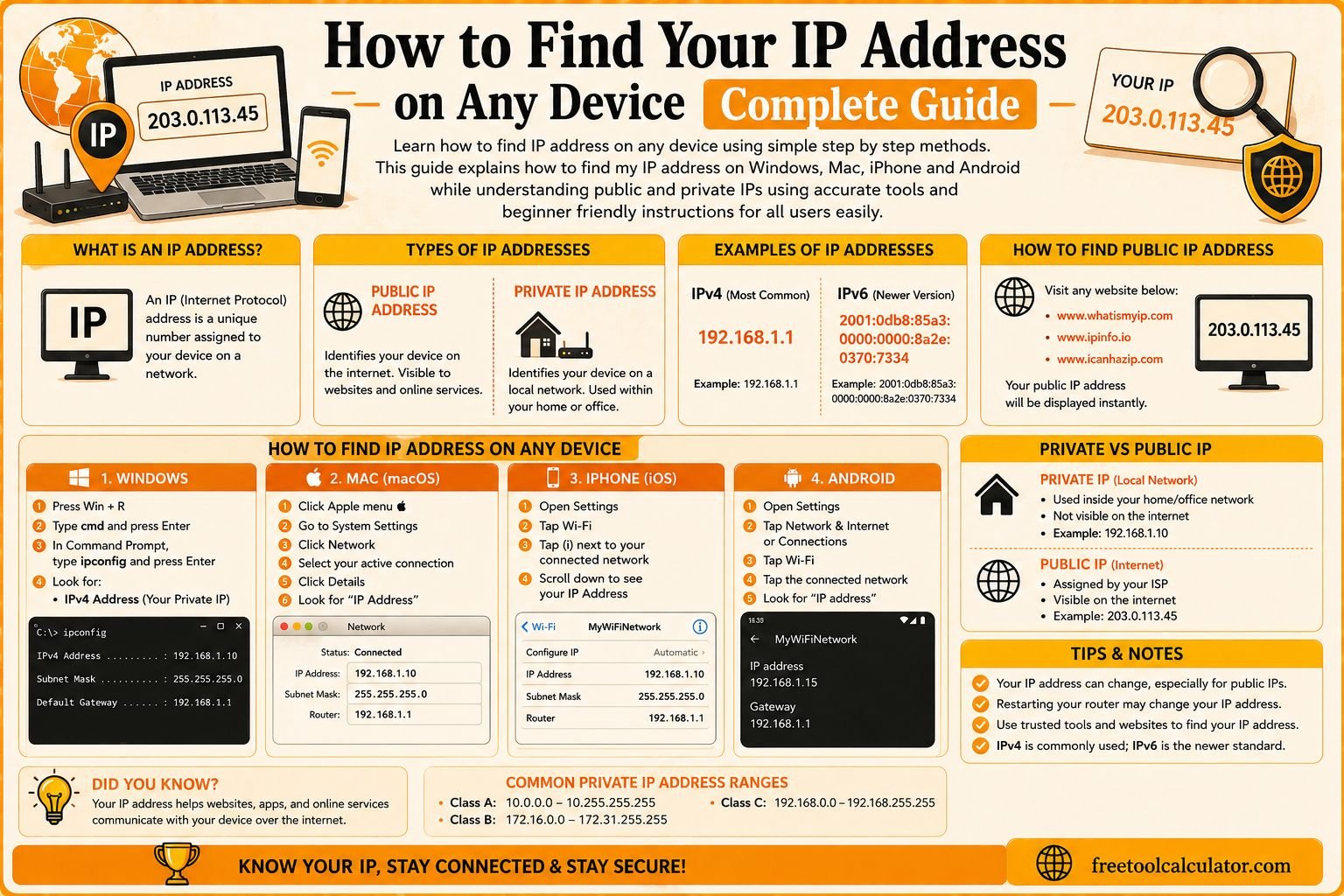
An IP address stands for Internet Protocol address. It is a unique identifier assigned to devices connected to a network. This address allows information to travel between devices correctly across the internet or local network.
Without IP addresses, websites and online services would not know where to send requested data. Every online activity, including browsing websites, streaming videos, or sending emails, relies on IP communication behind the scenes.
There are two major categories of IP addresses called public IP addresses and private IP addresses. Public IP addresses are visible online and assigned by internet service providers, while private IP addresses work inside local networks managed by routers. Understanding the difference helps users troubleshoot internet issues more effectively.
Difference Between Public and Private IP Addresses
Public IP addresses identify your network on the internet. Websites, apps, and online platforms can detect this address whenever you connect online. Usually, every home or office internet connection receives one public IP from the internet provider.
Private IP addresses work only within local networks. Your WiFi router assigns separate private IP addresses to each connected device such as phones, computers, smart TVs, and printers. These addresses help devices communicate internally without exposing local information publicly.
Understanding public and private addresses is important when learning how to find IP address information because different situations require different types of IP data.
How to Find My IP Address Online Instantly
The fastest method to find IP address details is by using an online IP lookup tool. These tools automatically detect your public IP address and display additional details such as location, ISP, browser information, and connection type.
To use an online IP checker, simply open the webpage from your browser. The tool instantly scans your network connection and shows your public IP address without downloads or setup.
You can check your public IP address instantly using this free tool on Windows, Mac, Android, iPhone, and tablets within seconds.
Find IP Address on Windows Step by Step
Windows users commonly search for how to find IP address on Windows because PCs remain one of the most widely used devices globally. There are multiple ways to access network information on Windows systems.
One method uses Windows Settings. Open Settings, navigate to Network and Internet, then select your connected network. Under network properties, you will find your IPv4 and IPv6 addresses listed clearly.
Another method uses Command Prompt. Open Command Prompt and type ipconfig, then press Enter. This displays detailed network information including local IP addresses, gateways, and network adapter settings.
These methods help users troubleshoot connectivity problems, configure routers, and manage local network settings more effectively.
How to Find IP Address on Mac Devices
Mac users can easily locate IP address information through System Settings. Open System Settings or System Preferences and select Network. Choose your active WiFi or Ethernet connection to view detailed network information.
Advanced users may also use Terminal commands for more technical network analysis. This approach provides deeper information useful for developers and IT professionals.
Understanding how to find IP address on Mac devices improves troubleshooting and gives users better control over internet settings and local network management.
How to Find IP Address on iPhone
Many people want to know how to find IP address on iPhone for troubleshooting WiFi issues, configuring smart devices, or improving privacy settings. Fortunately, the process is simple and beginner friendly.
Open the Settings app and tap WiFi. Next, select the connected network and scroll down to the IPv4 section. Your local IP address appears there alongside router and subnet information.
If you want to view your public IP address instead, you can simply open an online IP lookup tool through Safari. This works on all modern iPhone models and iOS versions.
How to Find IP Address on Android Devices
Android users can also access IP information through device settings. Open Settings, navigate to Network and Internet or Connections depending on the device brand, then tap WiFi and select the connected network.
Most Android devices show local IP addresses under advanced network settings. Although menus vary slightly between manufacturers, the general process remains similar.
Understanding how to find IP address on Android helps users manage WiFi networks, gaming devices, smart home systems, and internet troubleshooting more effectively.
Common Reasons People Need IP Address Information
There are many situations where users need to find IP address information. Gamers often need IP addresses for multiplayer hosting, NAT troubleshooting, and server configuration. Remote workers may require IP information while configuring VPN access or remote desktop systems.
Home users commonly use IP addresses when configuring routers, security cameras, printers, and smart home devices. Developers and website owners use IP information for server management, analytics, and cybersecurity testing.
Learning how to find my IP address helps users solve internet problems faster and improve digital confidence.
How IP Addresses Help Internet Communication
Every time you visit a website, your device sends requests through your IP address to a server. The server responds by sending website data back to your device. Routers and internet infrastructure use IP addresses to ensure information reaches the correct destination.
This entire process happens within milliseconds, allowing websites and apps to load almost instantly. Although most users never see these background processes, IP addressing is one of the most important foundations of modern networking.
Understanding this system helps users better appreciate how the internet works behind the scenes.
Common Internet Problems Related to IP Addresses
Several common internet issues involve IP addresses. One example is IP conflicts, where multiple devices accidentally receive the same local IP address, causing network interruptions. Restarting the router often fixes this issue automatically.
Dynamic IP changes may also affect online gaming, remote access systems, and hosting services because internet providers regularly rotate public IP addresses.
Incorrect DNS settings and router configuration problems may also create connection failures. Understanding IP basics helps users identify and resolve these issues more effectively.
How to Protect Your IP Address Online
Your public IP address can reveal approximate location details and internet provider information, so protecting it online is important for privacy and security. Many users use VPN services to hide their real IP address and replace it with another virtual location.
Avoid suspicious websites and unsafe downloads because malicious services may attempt to track IP addresses or exploit vulnerabilities. Keeping routers updated with the latest firmware also improves network security.
Privacy focused browsing habits reduce unnecessary exposure online and help users maintain safer internet usage.
Useful Networking Tools Related to IP Addresses
Several networking tools work alongside IP lookup tools to improve internet troubleshooting and performance monitoring. Speed tests help analyze internet connection quality, while DNS tools help examine domain server information.
You can also use the time zone converter when managing remote teams or international server access across different regions. Another useful utility is the DNS lookup tool, which helps analyze domain records and hosting details.
Combining multiple networking tools provides better understanding of internet performance, server communication, and network stability.
Difference Between IPv4 and IPv6
Most internet users encounter two main IP formats called IPv4 and IPv6. IPv4 uses shorter numerical addresses such as 192.168.1.1 and remains the most widely used system globally.
IPv6 was introduced because the internet required more available addresses for the growing number of connected devices worldwide. IPv6 addresses contain both letters and numbers and are significantly longer than IPv4 addresses.
Modern internet providers increasingly support both systems together to improve scalability and future compatibility.
Why Understanding IP Addresses Improves Digital Skills
Understanding IP addresses improves digital literacy and helps users become more independent when managing internet problems. Instead of relying entirely on technical support, users can solve many common networking issues themselves.
Knowledge of networking basics also improves cybersecurity awareness and helps users better manage routers, connected devices, and internet privacy settings.
As more devices become connected online, networking knowledge becomes increasingly valuable in everyday life.
Conclusion
Learning how to find IP address information is an essential skill for troubleshooting internet problems, managing networks, configuring devices, and improving online privacy. Whether you use Windows, Mac, iPhone, Android, or other connected devices, understanding IP addresses helps you use the internet more effectively and confidently.
If you want a fast and accurate way to check your network information, you can use this free IP checker tool. You can also improve your online productivity and internet management using helpful utilities like the time zone converter and DNS lookup tools for better networking and server analysis.