Pay-per-click (PPC) advertising is one of the fastest ways to drive targeted traffic to your website. Whether you’re running Google Ads, Microsoft Ads, or social media campaigns, success depends on more than choosing the right keywords—it starts with setting the right budget.
Many businesses either overspend without generating enough conversions or set budgets that are too small to produce meaningful results. Learning how to calculate a PPC budget helps you balance advertising costs with revenue goals while maximizing your return on investment (ROI).
If you want a simple way to organize your advertising expenses and overall marketing budget, try our free Budget Calculator. It helps you plan spending efficiently and maintain better financial control before launching your campaigns.
Quick Answer: How Do You Calculate a PPC Budget?
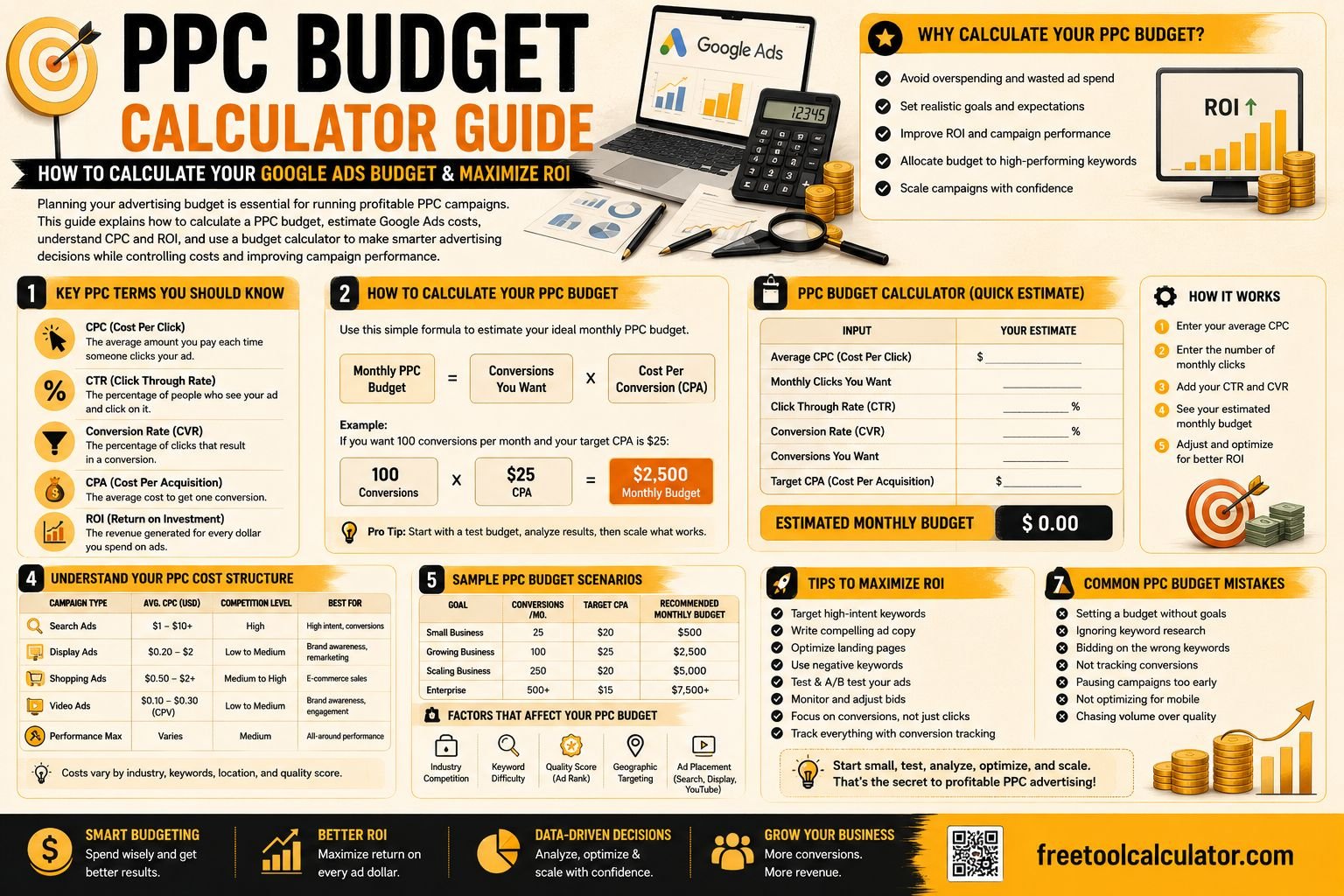
A PPC budget is typically calculated using your advertising goals, expected cost per click (CPC), conversion rate, and desired number of conversions.
A simple budgeting formula is:
Monthly PPC Budget = Expected Monthly Clicks × Average CPC
For example:
- Expected Clicks = 2,000
- Average CPC = $1.50
Monthly Budget = 2,000 × $1.50 = $3,000
This estimate provides a starting point. Your final budget should also consider conversion rates, customer value, seasonality, and competition.
What Is a PPC Budget?
A PPC budget is the maximum amount of money you plan to spend on paid advertising over a specific period, such as daily, weekly, or monthly. Platforms like Google Ads allow advertisers to set daily budgets, while businesses often manage advertising performance using monthly spending goals.
Your PPC budget determines how many clicks your ads can receive before your budget is exhausted. A properly planned budget ensures your ads remain competitive without overspending.
Why Budget Planning Matters
Without a structured budget, it’s easy to spend money on keywords that generate traffic but fail to produce sales or leads. Budget planning helps you allocate resources toward campaigns that deliver measurable business results.
A well-planned PPC budget also makes it easier to forecast marketing expenses, estimate lead generation costs, and measure campaign profitability.
Understanding the Core PPC Metrics
Before calculating your advertising budget, it’s important to understand the key metrics that influence campaign costs.
Cost Per Click (CPC)
Cost Per Click is the amount you pay each time someone clicks your advertisement. CPC varies based on industry, keyword competition, Quality Score, and bidding strategy.
Highly competitive industries like legal services or insurance often have much higher CPC values than local businesses or niche markets.
Click-Through Rate (CTR)
CTR measures how often users click your advertisement after seeing it.
CTR = (Clicks ÷ Impressions) × 100
A higher CTR often indicates that your ads are relevant to your target audience.
Conversion Rate
The conversion rate measures how many visitors complete a desired action after clicking your advertisement.
Examples of conversions include:
- Purchasing a product
- Submitting a contact form
- Booking an appointment
- Downloading an ebook
- Signing up for a newsletter
Cost Per Acquisition (CPA)
CPA represents the average amount you spend to acquire one customer or lead.
CPA = Total Ad Spend ÷ Number of Conversions
Monitoring CPA helps determine whether your advertising campaigns remain profitable.
How to Calculate Your PPC Budget
There are several ways to estimate an advertising budget depending on your campaign objectives.
Method 1: Budget Based on Clicks
The simplest calculation estimates spending based on expected clicks.
Budget = Expected Clicks × Average CPC
Example:
| Metric | Value |
|---|---|
| Monthly Clicks | 3,000 |
| Average CPC | $2.00 |
| Estimated Budget | $6,000 |
This approach works well when historical traffic data is available.
Method 2: Budget Based on Sales Goals
Another approach begins with the number of customers you want to acquire.
Suppose your business wants:
- 100 monthly sales
- 5% conversion rate
- $1.75 average CPC
Step 1:
Required clicks:
100 ÷ 5% = 2,000 clicks
Step 2:
Advertising budget:
2,000 × $1.75 = $3,500
This method aligns your marketing budget with business growth objectives rather than traffic alone.
Factors That Influence Google Ads Budget
Every advertising campaign is different. Several variables affect how much you’ll need to spend.
Industry Competition
Competitive industries usually have higher CPC values because multiple advertisers bid for the same keywords.
Keyword Selection
Broad, highly searched keywords generally cost more than long-tail keywords with lower competition.
Quality Score
Google rewards relevant advertisements with better Quality Scores. Higher scores often reduce CPC while improving ad positions.
Geographic Targeting
Advertising in large metropolitan areas often costs more than targeting smaller cities or regional markets due to increased competition.
Seasonality
Advertising costs frequently increase during major shopping periods, holidays, and seasonal demand spikes.
How ROI Fits Into PPC Budget Planning
Spending more on advertising doesn’t always produce better results. The goal is to maximize return on investment rather than simply increasing traffic.
The standard ROI formula is:
ROI = ((Revenue − Advertising Cost) ÷ Advertising Cost) × 100
Example:
- Advertising Cost = $4,000
- Revenue = $16,000
ROI = ((16,000 − 4,000) ÷ 4,000) × 100 = 300%
Monitoring ROI helps determine whether your campaigns are generating sustainable business growth rather than simply attracting website visitors.
If you’re evaluating campaign profitability, our ROI Calculator makes it easy to measure your return on investment. You can also organize your overall marketing expenses using the Budget Calculator before scaling your advertising campaigns.
How to Plan Your Daily and Monthly Google Ads Budget
Google Ads allows advertisers to set a daily budget rather than a fixed monthly budget. Google may spend slightly more or less than your daily budget on individual days, but it generally keeps your monthly spending close to your daily budget multiplied by the average number of days in a month.
Daily Budget Formula
Daily Budget = Monthly Budget ÷ 30.4
Example:
| Monthly Budget | Daily Budget |
|---|---|
| $3,000 | Approximately $99 per day |
| $5,000 | Approximately $164 per day |
| $10,000 | Approximately $329 per day |
Setting a realistic daily budget helps ensure your campaigns remain active throughout the month without exhausting funds too early.
Tips for Optimizing Your PPC Budget
Creating a budget is only the first step. Continuous optimization helps you get more value from every advertising dollar.
Focus on High-Intent Keywords
Keywords that indicate strong buying intent often generate higher conversion rates. Although they may have higher CPCs, they frequently produce a better return on investment.
Improve Quality Score
Google rewards relevant advertisements with lower click costs and better ad positions. Improving ad relevance, landing page experience, and expected click-through rate can reduce your overall advertising costs.
Use Negative Keywords
Negative keywords prevent your ads from appearing in irrelevant searches, reducing wasted clicks and preserving your advertising budget.
Monitor Campaign Performance Regularly
Review your campaigns frequently to identify underperforming keywords, advertisements, and audiences. Redirect your budget toward campaigns producing the highest return.
Test Different Advertisements
Running A/B tests on headlines, descriptions, and calls to action helps improve click-through rates and conversion rates without necessarily increasing your budget.
Common PPC Budget Planning Mistakes
Many advertisers lose money because of avoidable budgeting mistakes. Understanding these pitfalls can significantly improve campaign performance.
Setting Unrealistically Small Budgets
A budget that is too low may prevent your advertisements from gathering enough clicks and data to optimize performance effectively.
Ignoring Conversion Tracking
Traffic alone doesn’t determine success. Without conversion tracking, it’s impossible to know which campaigns generate actual customers.
Focusing Only on Cheap Clicks
Low CPC doesn’t always mean better profitability. A higher-cost keyword that converts consistently may generate much greater revenue.
Not Reviewing Search Terms
Search term reports reveal the actual queries triggering your advertisements. Reviewing these reports helps eliminate irrelevant traffic.
Making Frequent Budget Changes
Constantly increasing or decreasing budgets can make campaign performance difficult to evaluate. Allow campaigns enough time to gather meaningful data before making major adjustments.
PPC Budget Example for a Small Business
Imagine a local home service company launching its first Google Ads campaign.
| Metric | Value |
|---|---|
| Monthly Budget | $2,500 |
| Average CPC | $2.50 |
| Estimated Clicks | 1,000 |
| Conversion Rate | 8% |
| Estimated Leads | 80 |
| Average Sale Value | $250 |
| Potential Revenue | $20,000 |
This example illustrates how a carefully planned advertising budget can generate significant revenue when campaigns are properly optimized.
Why Use a Budget Calculator?
Manually estimating advertising expenses can become complicated when multiple campaigns, platforms, and marketing channels are involved.
A budget calculator simplifies financial planning by helping you:
- Track marketing expenses.
- Compare planned and actual spending.
- Allocate funds across multiple campaigns.
- Avoid overspending.
- Support better financial decision-making.
Our free Budget Calculator provides an easy way to organize your overall marketing and business expenses before launching PPC campaigns.
Related Financial Planning Tools
If you’re managing advertising budgets, these additional calculators can help improve your financial planning and campaign profitability.
- ROI Calculator – Measure the return on your advertising investment.
- Profit Margin Calculator – Calculate profit margins for products and services.
- Break-Even Calculator – Estimate how many sales you need to recover advertising costs.
- Commission Calculator – Calculate sales commissions for marketing and sales teams.
Frequently Asked Questions
How much should I budget for Google Ads?
There is no universal budget that works for every business. Your ideal budget depends on your industry, average CPC, competition, conversion rate, and overall marketing goals. Many small businesses begin with a manageable monthly budget and gradually increase spending as campaigns become profitable.
What is a good CPC for Google Ads?
A good CPC varies by industry and keyword competition. Rather than focusing solely on the lowest click cost, evaluate whether each click generates profitable conversions and supports your overall business objectives.
How do I calculate my PPC budget?
You can estimate your budget by multiplying your expected monthly clicks by your average cost per click. Businesses with revenue goals often work backward from desired conversions to determine the required advertising budget.
Should I increase my PPC budget every month?
Increase your budget only when campaigns consistently generate positive returns. Scaling profitable campaigns is generally more effective than increasing spending on underperforming advertisements.
Can a budget calculator help with Google Ads planning?
Yes. A budget calculator helps organize your finances, estimate available advertising funds, and monitor spending throughout the campaign, making financial planning much easier.
Conclusion
Building a successful PPC strategy begins with careful financial planning. Understanding CPC, conversion rates, CPA, and ROI allows you to create realistic budgets that support sustainable business growth rather than simply generating website traffic.
Whether you’re managing a small local campaign or a large national advertising account, calculating your budget before launching campaigns helps reduce wasted spending and improves long-term profitability.
To simplify your financial planning, use our free Budget Calculator. You can also evaluate campaign profitability with the ROI Calculator, estimate earnings using the Profit Margin Calculator, and determine sales targets with the Break-Even Calculator. Together, these tools provide a stronger foundation for smarter advertising decisions and long-term business success.