CSS Beautify Tool and Why It Is Important
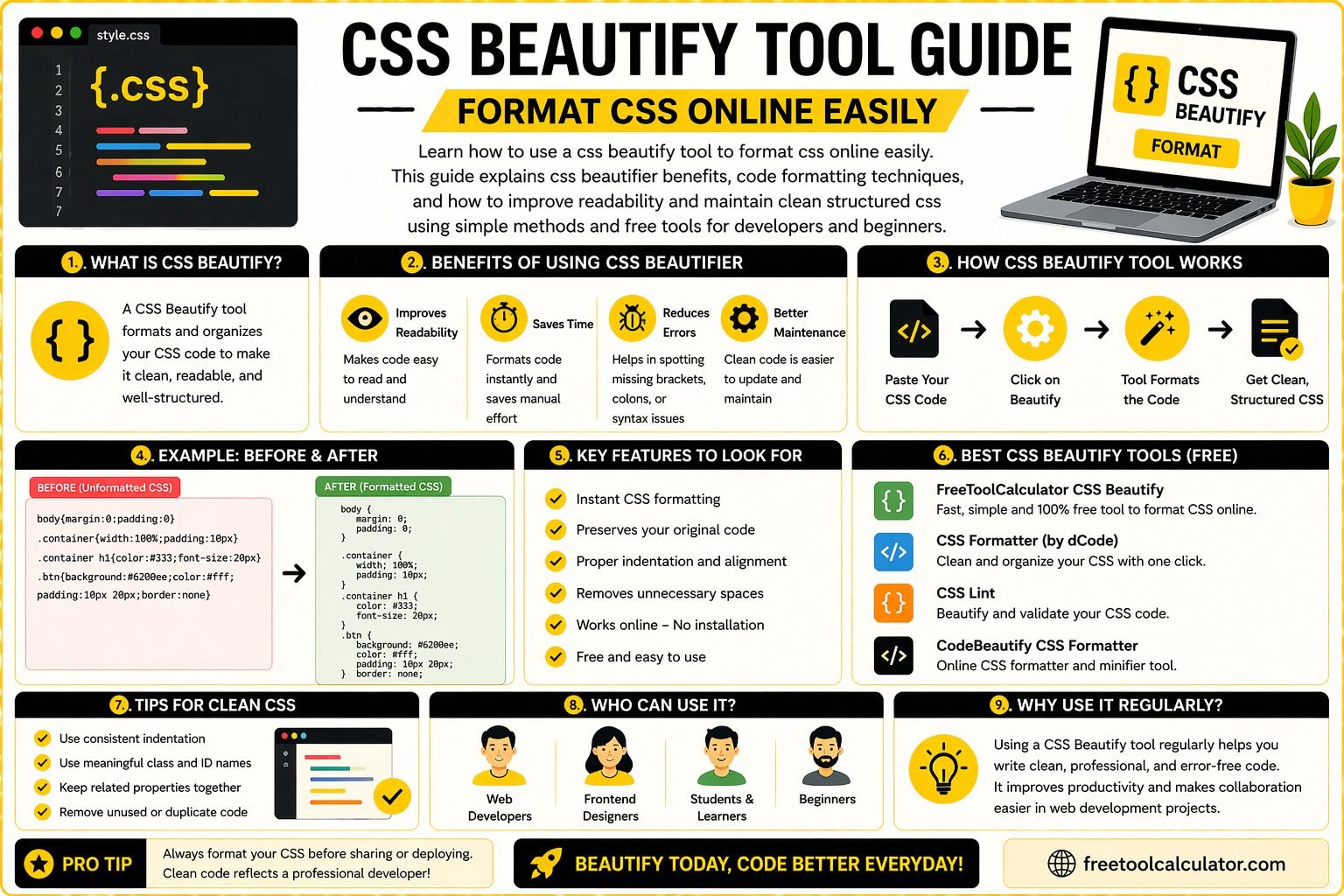
A css beautify tool is an essential utility for developers who want to keep their code clean, readable, and well structured. CSS files can quickly become messy, especially when working on large projects or copying code from different sources. Poorly formatted CSS makes debugging difficult and slows down development. Using a css beautifier helps organize your code automatically and improves overall productivity.
Clean code is not just about aesthetics, it directly impacts maintainability and collaboration. When multiple developers work on the same project, properly formatted CSS ensures everyone can understand and edit the code efficiently. You can easily format css online using this free css beautify tool and instantly transform messy code into a structured format.
What Is CSS Beautify and How It Works
CSS beautify refers to the process of formatting CSS code by adding proper indentation, spacing, and line breaks. This process makes the code easier to read and understand without changing its functionality. A css online beautifier automates this process, saving time and effort.
When you paste your CSS into a beautifier tool, it analyzes the structure of the code and rearranges it into a clean format. This includes aligning properties, organizing selectors, and ensuring consistent spacing.
Understanding how css beautify works helps developers maintain better coding practices and improve workflow efficiency. It is a simple yet powerful way to enhance code quality.
Benefits of Using a CSS Beautifier
Using a css beautifier offers several advantages for developers and designers. The most important benefit is improved readability. Clean code is easier to understand, which reduces errors and speeds up debugging.
Another benefit is better collaboration. When code is properly formatted, team members can quickly understand and modify it without confusion. This is especially important in large projects where multiple developers are involved.
A css beautify tool also helps maintain consistency across your codebase. Consistent formatting improves professionalism and ensures that your project follows best practices.
How to Format CSS Online Easily
Formatting CSS online is a simple process that requires only a few steps. First, copy your unformatted CSS code. Then paste it into an online beautifier tool.
Next, click the format or beautify button. The tool will automatically restructure your code with proper indentation and spacing. Finally, copy the formatted code and use it in your project.
You can use this css online beautifier to quickly format your code without installing any software. This makes it convenient for developers working on different devices.
Common Issues in Unformatted CSS Code
Unformatted CSS code often leads to several problems. One common issue is difficulty in reading and understanding the code. Without proper indentation, it becomes hard to identify selectors and properties.
Another issue is increased chances of errors. Missing brackets or incorrect spacing can cause unexpected behavior in your styles. Debugging such issues takes more time when the code is not properly structured.
Using a css beautify tool eliminates these problems by organizing the code and making it easier to work with. This improves both efficiency and accuracy.
CSS Beautify vs Minify What Is the Difference
CSS beautify and minify are two different processes with opposite goals. Beautifying CSS focuses on making the code readable by adding spaces and line breaks. Minifying CSS, on the other hand, removes all unnecessary characters to reduce file size.
Both processes are important in web development. Beautified code is used during development, while minified code is used in production to improve website performance.
Understanding this difference helps developers use the right approach at the right time. You can also use a css minify tool to optimize your code for faster loading speeds after formatting it.
Best Practices for Writing Clean CSS
Writing clean CSS starts with following proper coding standards. Use meaningful class names and organize your styles logically. Group related properties together to improve readability.
Consistent indentation and spacing are also important. This makes your code easier to scan and understand. Avoid unnecessary duplication and keep your code concise.
Using tools like a css beautifier ensures that your code remains clean even when working on complex projects. It also helps maintain consistency across your work.
Advanced Tips to Improve CSS Workflow
To improve your workflow, consider using automation tools and preprocessors such as Sass or Less. These tools allow you to write more efficient and modular CSS.
Version control systems like Git also help manage changes and collaborate with team members. Combining these tools with a css beautify tool creates a powerful development environment.
You can also use a html beautify tool to format your HTML code and maintain consistency across your project. This ensures that both your structure and styling are clean and organized.
Why Online CSS Beautifier Tools Are Useful
Online css beautifier tools are highly convenient because they can be accessed from any device with an internet connection. There is no need to install software or configure settings.
These tools are also fast and efficient. They provide instant results, allowing you to focus on development rather than formatting.
Using online tools ensures that you always have access to the latest features and updates. This makes them a valuable resource for both beginners and experienced developers.
Common Mistakes When Using CSS Beautify Tools
One common mistake is relying solely on tools without understanding the underlying code. While beautifiers improve readability, developers should still learn proper coding practices.
Another mistake is not reviewing the formatted code. Although tools are accurate, it is always a good idea to double check the output.
Using multiple formatting styles inconsistently can also cause confusion. Stick to a standard format to maintain consistency across your project.
How CSS Beautify Tool Improves Productivity
A css beautify tool significantly improves productivity by reducing the time spent on manual formatting. Developers can focus on writing code and solving problems instead of organizing styles.
Clean code also speeds up debugging and reduces errors. This leads to faster development cycles and better results.
By integrating a css beautifier into your workflow, you can maintain high quality code and improve overall efficiency.
Conclusion CSS Beautify Tool for Clean and Efficient Code
A css beautify tool is an essential resource for anyone working with CSS. It helps format css online easily, improves readability, and enhances productivity.
If you want to clean and organize your code instantly, you can use this free css beautify tool along with other related tools to optimize your workflow. Clean and well structured code ensures better performance and long term success in web development.